Introduction
This section describes the fundamentals of Web.Link. For information on how to set up your environment, see the section Setting Up Web.Link.
Overview
Web.Link links the World Wide Web to Creo Parametric, enabling you to use the Web as a tool to automate and streamline parts of your engineering process.
Pro/Web.Link in Pro/ENGINEER Wildfire has been simplified and enhanced with new capabilities by the introduction of an embedded web browser in Pro/ENGINEER. Web.Link pages can be loaded directly into the embedded browser of Creo Parametric.
Creo Parametric is always connected to the contents of the embedded browser and there is no need to start or connect to Creo Parametric from Web.Link compared to the old version of Web.Link, where web pages had to try to start or connect to Creo Parametric.
Creo Parametric supports the embedded browser versions of Web.Link on Windows platforms using the Chromium browser. The configuration option windows_browser_type allows you to configure the Creo Parametric browser using the following values:
•  ie_browser— Specifies that Creo Parametric will use the Internet Explorer browser engine in a Creo agent process initiated from the Creo process.
•  chromium_browser—This is the default value. Specifies that Creo Parametric will use the Chromium browser engine in a Creo agent process initiated from the Creo process.
Although Web.Link still supports the old 'PWL' style methods, PTC does not recommend the use of PWL. Instead you should use JavaScript version of 'PFC' (Parametric Foundation Classes), which is the basis for the J-Link interface as well. This guide provides instructions on how to switch from ‘PWL’ to ‘PFC’.
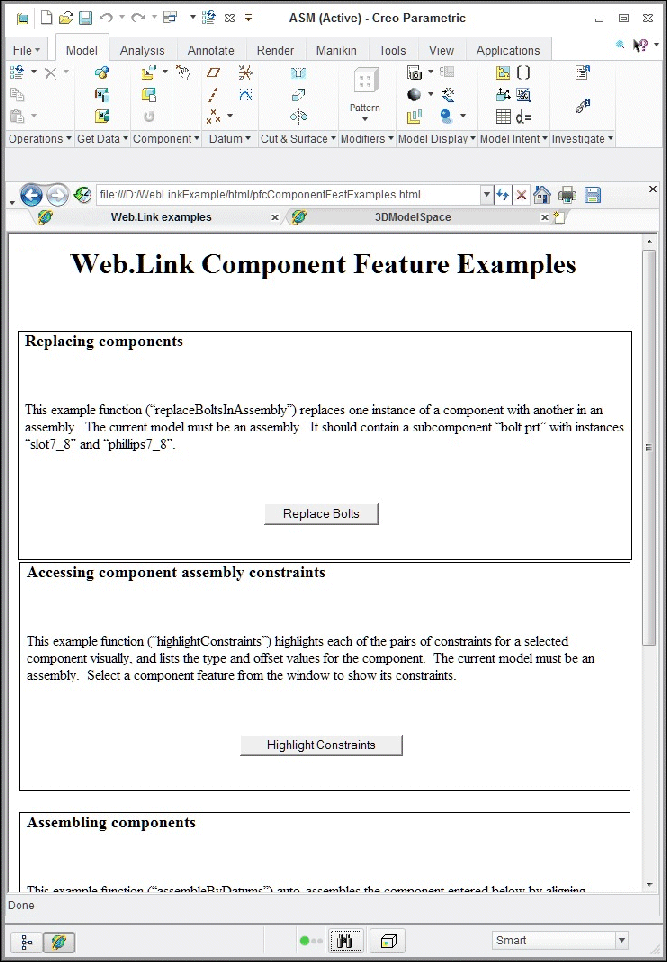
The embedded browser version of Web.Link is as shown in the following figure.
Image
Loading Application Web Pages
To load and run a Web.Link application web page:
1. Ensure that Web.Link is set up to run properly. See the section Setting Up Web.Link for more details.
2. Type the URL for the page directly into the embedded browser address bar, follow a link in the embedded browser to a Web.Link enabled page, or load the web page into the embedded browser via the navigation tools in the Creo Parametric navigator. The Creo Parametric navigator contains the following navigation tools:
•  Folders—(Default) Provides navigation of the local file system, the local network, and Internet data.
•  Favorites—Contains user-selected Web locations (bookmarks) and paths to Creo Parametric objects, database locations, or other points of interest.
•  Search—Provides search capability for objects in the data management system.
Note
The Search option appears when you declare a Windchill system as your primary data management system.
•  History—Provides a record of Creo Parametric objects you have opened and Web locations you have visited. Click the History icon on the browser toolbar to add the option to the Creo Parametric navigator.
•  Connections—Provides access to connections and built-in PTC solutions, such as Pro/COLLABORATE, PartsLink, and the PTC User area.
3. Depending upon how the application web page is constructed, the Web.Link code may run upon loading of the page, or may be invoked by changes in the forms and components embedded in the web page.
4. Navigate to a new Web.Link enabled page using the same techniques defined above.
Note
The Web.Link pages do not stay resident in the Creo Parametric session; the application code is only accessible while the page is loaded in the embedded browser.
Object Types
Web.Link is made up of a number classes in many packages. The following are the seven main class types:
•  Creo Parametric-Related Classes—Contain unique methods and properties that are directly related to the functions in Creo Parametric. See the section Pro/ENGINEER-Related Classes for more information.
•  Compact Data Classes—Classes containing data needed as arguments to some Web.Link methods. See the section, Compact Data Classes, for additional information.
•  Union Classes—A class with a potential for multiple types of values. See the section Unions for additional information.
•  Sequence Classes—Expandable arrays of objects or primitive data types. See the section Sequences for more information.
•  Array Classes—Arrays that are limited to a certain size. See the section Arrays for more information.
•  Enumeration Classes—Defines enumerated types. See the section Enumeration Classes for more information.
•  Module-Level Classes—Contains static methods used to initialize certain Web.Link objects. See the Module-Level Classes section for more information.
Each class shares specific rules regarding initialization, attributes, methods, inheritance, or exceptions. The following seven sections describe these classes in detail.
Creo Parametric-Related Classes
The Creo Parametric-Related Classes contain methods that directly manipulate objects in Creo Parametric. Examples of these objects include models, features, and parameters.
Initialization
You cannot construct one of these objects explicitly using JavaScript syntax. Objects that represent Creo Parametric objects cannot be created directly but are returned by a Get or Create method.
For example, pfcBaseSession.CurrentModel returns a pfcModel object set to the current model and pfcParameterOwner.CreateParam returns a newly created Parameter object for manipulation.
Properties
Properties within Creo Parametric-related objects are directly accessible. Some attributes that have been designated as read can only be accessed, but not modified by Web.Link.
Methods
You must invoke Methods from the object in question and you must first initialize that object. For example, the following calls are illegal:
var window;
window.SetBrowserSize (0.0);// The window has not yet 
                            //been initialized.

Repaint();                  // There is no invoking object.
The following calls are legal:
var session = pfcCreat ("MpfcCOMGlobal").GetProESession();
var window = session.CurrentWindow;
   // You have initialized the window object.
window.SetBrowserSize (0.0);
window.Repaint();
Inheritance
Many Creo Parametric related objects inherit methods from other interfaces. JavaScript allows you to invoke any method or property assigned to the object or its parent. You can directly invoke any property or method of a subclass, provided you know that the object belongs to that subclass.
For example, a component feature could use the methods and properties as follows:
•  pfcObject
•  pfcChild
•  pfcActionSource
•  pfcModelItem
•  pfcFeature
•  pfcComponentFeat
Compact Data Classes
Compact data classes are data-only classes. They are used for arguments and return values for some Web.Link methods. They do not represent actual objects in Creo Parametric.
Initialization
You can create instances of these classes using a static create method. In order to call a static method on the class, you must first instantiate the appropriate class object:
var instrs = pfcCreate ("pfcBOMExportInstructions").Create();
Properties
Properties within compact data related classes are directly accessible. Some attributes that have been designated as read can only be accessed, but not modified by Web.Link.
Methods
You must invoke non-static methods from the object in question and you must first initialize that object.
Inheritance
Compact objects can inherit methods from other compact interfaces. To use these methods, call them directly (no casting needed).
Unions
Unions are classes containing potentially several different value types. Every union has a discriminator property with the pre-defined name discr. This method returns a value identifying the type of data that the union object holds. For each union member, a separate property is used to access the different data types. It is illegal to attempt to read any property except the one that matches the value returned from the discriminator. However, any property that switches the discriminator to the new value type can be modified.
The following is an example of a Web.Link union:
class ParamValue
{
    pfcParamValueType            discr;
    string                       StringValue;
    integer                      IntValue;
    boolean                      BoolValue;
    number                       DoubleValue;
    integer                      NoteId;
};
Sequences
Sequences are expandable arrays of primitive data types or objects in Web.Link. All sequence classes have the same methods for adding to and accessing the array. Sequence classes are typically identified by a plural name, or the suffix seq.
Initialization
You can create instances of these classes directly by instantiating the appropriate class object:
var models = pfcCreate ("pfcModels");
Properties
The read-only Count attribute identifies how many members are currently in the sequence.
Methods
Sequence objects always contain the same methods. Use the following methods to access the contents of the sequence:
•  Item()
•  Set()
•  Append()
•  Insert()
•  InsertSeq()
•  Remove()
•  Clear()
Inheritance
Sequence classes do not inherit from any other Web.Link classes. Therefore, you cannot use sequence objects as arguments where any other type of Web.Link object is expected, including other types of sequences. For example, if you have a list of pfcModelItems that happen to be features, you cannot use the sequence as if it were a sequence of pfcFeatures.
To construct the array of features, you must insert each member of the pfcModelItems list into the new pfcFeatures list.
Exceptions
If you try to get or remove an object beyond the last object in the sequence, an exception will be thrown.
Arrays
Arrays are groups of primitive types or objects of a specified size. An array can be one or two dimensional. The online reference documentation indicates the exact size of each array class.
Initialization
You can create instances of these classes directly by instantiating the appropriate class object:
var point = pfcCreate ("pfcPoint3D");
Methods
Array objects always contain the same methods: Item and Set, used to access the contents of the array.
Inheritance
Array classes do not inherit from any other Web.Link classes.
Exceptions
If you try to access an object that is not within the size of the array, an exception will be thrown.
Enumeration Classes
In Web.Link, an enumeration class defines a limited number of values which correspond to the members of the enumeration. Each value represents an appropriate type and may be accessed by name. In the pfcFeatureType enumeration class the value FEATTYPE_HOLE represents a Hole feature in Creo Parametric. Enumeration classes in Web.Link generally have names of the form pfcXYZType or pfcXYZStatus.
Initialization
You can create instances of these classes directly by instantiating the appropriate class object:
var modelType = pfcCreate ("pfcModelType");
Attributes
An enumeration class is made up of constant integer properties. The names of these properties are all uppercase and describe what the attribute represents. For example:
•  PARAM_INTEGER—A value in the pfcParamValueType enumeration class that is used to indicate that a parameter stores an integer value.
•  ITEM_FEATURE—An value in the pfcModelItemType enumeration class that is used to indicate that a model item is a feature.
An enumeration class always has an integer vale named <type>_nil, which is one more than the highest acceptable numerical value for that enumeration class.
Module-Level Classes
Some modules in Web.Link have one class that contains special static functions used to create and access some of the other classes in the package. These module classes have the naming convention: "M"+ the name of the module, as in MpfcSelect.
Initialization
You can create instances of these classes directly by instantiating the appropriate class object:
var session = pfcCreate ("MpfcCOMGlobal").GetProESession();
Properties
Module-level classes do not have any accessible attributes.
Methods
Module-level classes contain only static methods used for initializing certain Web.Link objects.
Inheritance
Module-level classes do not inherit from any other Web.Link classes.
Programming Considerations
The items in this section introduce programming tips and techniques used for programming Web.Link in the embedded browser.
Creating Platform Independent Code
PTC recommends constructing web pages in a way that will work for Windows.
For Chromium browser, the Web.Link classes must be instantiated in the following way:
pfcCefCreate (className);
Use the function pfcCreate() in any situation where a Web.Link object or class must be initialized using its string name. For convenience, these and other useful Web.Link utilities are provided in a file in the example set located at:
<creo_weblink_loadpoint>/weblinkexamples /jscript/pfcUtils.js
Variable Typing
Although JavaScript is not strongly typed, the interfaces in Web.Link do expect variables and arguments of certain types. The following primitive types are used by Web.Link and its methods:
•  boolean—a JavaScript Boolean, with valid values true and false.
•  integer—a JavaScript Number of integral type.
•  number—a JavaScript Number; it need not be integral.
•  string—a JavaScript String object or string literal.
These variable types, as well as all explicit object types, are listed in the Web.Link documentation for each property and method argument.
PTC recommends that Web.Link applications ensure that values passed to Web.Link classes are of the correct type.
Optional arguments and tags
Many methods in Web.Link are shown in the online documentation as having optional arguments.
For example, the pfcModelItemOwner.ListItems() method takes an optional Type argument.
pfcModelItems ListItems (/*optional*/ pfcModelItemType  Type);
You can pass the JavaScript value keyword void null in place of any such optional argument. The Web.Link methods that take optional arguments provide default handling for void null parameters which is described in the online documentation.
Note
You can only pass void null in place of arguments that are shown in the documentation to be "optional".
Optional Returns for Web.Link Methods
Some methods in Web.Link have an optional return. Usually these correspond to lookup methods that may or may not find an object to return. For example, the pfcBaseSession.GetModel() method returns an optional model:
/*optional*/ pfcModel GetModel(string Name, 
                               pfcModelType Type);
Web.Link might return void null in certain cases where these methods are called. You must use appropriate value checks in your application code to handle these situations.
Parent-Child Relationships Between Web.Link Objects
Some Web.Link objects inherit from either the module pfcObject.Parent or pfcObject.Child. These interfaces are used to maintain a relationship between the two objects. This has nothing to do with Java or JavaScript inheritance. In Web.Link, the Child is owned by the Parent.
Property Introduced:
The pfcChild.DBParent property returns the owner of the child object. The application developer must know the expected type of the parent in order to use it in later calls. The following table lists parent/child relationships in Web.Link.
Parent
Child
pfcSession
pfcModel
pfcSession
pfcWindow
pfcModel
pfcModelItem
pfcSolid
pfcFeature
pfcModel
pfcParameter
pfcModel
pfcExternalDataAccess
pfcPart
pfcMaterial
pfcModel
pfcView
pfcModel2D
pfcView2D
pfcSolid
pfcXSection
pfcSession
pfcDll (Creo TOOLKIT)
pfcSession
pfcApplication (J-Link)
Run-Time Type Identification in Web.Link
Web.Link and the JavaScript language provides several methods to identify the type of an object.
Many Web.Link classes provide read access to a type enumerated class. For example, the pfcFeature class has a pfcFeature.FeatType property, returning a pfcFeatureType enumeration value representing the type of the feature. Based upon the type, a user can recognize that the pfcFeature object is actually a particular subtype, such as pfcComponentFeat, which is an assembly component.
Exceptions
Web.Link signals error conditions via exceptions. Exceptions may be caught and handled via a try/catch block surrounding Web.Link code. If exceptions are not caught, they may be ignored by the web browser altogether, or may present a debug dialog box to the user.
Descriptions for Web.Link exceptions may be accessed in a platform-independent way using the JavaScript utility function pfcGetExceptionDescription(), included in the example files in pfcUtils.js. This function returns the full exception description as [Exception type]; [additional details]. The exception type will be the module and exception name, for example, pfcExceptions.XToolkitCheckoutConflict.
The additional details will include details which were contained in the exception when it was thrown by the PFC layer, like conflict descriptions for exceptions caused by server operations and error details for exceptions generated during drawing creation.
PFC Exceptions
The methods that make up Web.Link's public interface may throw the PFC exceptions. The following table describes some of these exceptions.
Exception
Purpose
pfcExceptions.XBadExternalData
An attempt to read contents of an external data object which has been terminated.
pfcExceptions.XBadGetArgValue
Indicates attempt to read the wrong type of data from the pfcArgValue union.
pfcExceptions.XBadGetExternalData
Indicates attempt to read the wrong type of data from the pfcExternalData union.
pfcExceptions.XBadGetParamValue
Indicates attempt to read the wrong type of data from the pfcParamValue union.
pfcExceptions.XBadOutlineExcludeType
Indicates an invalid type of item was passed to the outline calculation method.
pfcExceptions.XCannotAccess
The contents of a Web.Link object cannot be accessed in this situation.
pfcExceptions.XEmptyString
An empty string was passed to a method that does not accept this type of input.
pfcExceptions.XInvalidEnumValue
Indicates an invalid value for a specified enumeration class.
pfcExceptions.XInvalidFileName
Indicates a file name passed to a method was incorrectly structured.
pfcExceptions.XInvalidFileType
Indicates a model descriptor contained an invalid file type for a requested operation.
pfcExceptions.XInvalidModelItem
Indicates that the item requested to be used is no longer usable (for example, it may have been deleted).
pfcExceptions.XInvalidSelection
Indicates that the pfcSelection passed is invalid or is missing a needed piece of information. For example, its component path, drawing view, or parameters.
pfcExceptions.XJLinkApplicationException
Contains the details when an attempt to call code in an external J-Link application failed due to an exception.
pfcExceptions.XJLinkApplicationInactive
Unable to operate on the requested pfcJLinkApplication object because it has been shut down.
pfcExceptions.XJLinkTaskNotFound
Indicates that the J-Link task with the given name could not be found and run.
pfcExceptions.XModelNotInSession
Indicates that the model is no longer in session; it may have been erased or deleted.
pfcExceptions.XNegativeNumber
Numeric argument was negative.
pfcExceptions.XNumberTooLarge
Numeric argument was too large.
pfcExceptions.XProEWasNotConnected
The Creo Parametric session is not available so the operation failed.
pfcExceptions.XSequenceTooLong
Sequence argument was too long.
pfcExceptions.XStringTooLong
String argument was too long.
pfcExceptions.XUnimplemented
Indicates unimplemented method.
pfcExceptions.XUnknownModelExtension
Indicates that a file extension does not match a known Creo Parametric model type.
Creo Parametric TOOLKIT Errors
The pfcExceptions.XToolkitError exception provides access to error codes from Creo TOOLKIT functions that Web.Link uses internally and to the names of the functions returning such errors. pfcExceptions.XToolkitError is the exception you are most likely to encounter because Web.Link is built on top of Creo TOOLKIT. The following table lists the integer values that can be returned by the pfcXToolkitError.GetErrorCode method and shows the corresponding Creo TOOLKIT constant that indicates the cause of the error. Each specific pfcExceptions.XToolkitError exception is represented by an appropriately named child class. The child class name (for example pfcExceptions.XToolkitGeneralError, will be returned by the error's description property.
pfcXToolkitError Child Class
Creo Parametric TOOLKIT Error
#
pfcExceptions.XToolkitGeneralError
PRO_TK_GENERAL_ERROR
-1
pfcExceptions.XToolkitBadInputs
PRO_TK_BAD_INPUTS
-2
pfcExceptions.XToolkitUserAbort
PRO_TK_USER_ABORT
-3
pfcExceptions.XToolkitNotFound
PRO_TK_E_NOT_FOUND
-4
pfcExceptions.XToolkitFound
PRO_TK_E_FOUND
-5
pfcExceptions.XToolkitLineTooLong
PRO_TK_LINE_TOO_LONG
-6
pfcExceptions.XToolkitContinue
PRO_TK_CONTINUE
-7
pfcExceptions.XToolkitBadContext
PRO_TK_BAD_CONTEXT
-8
pfcExceptions.XToolkitNotImplemented
PRO_TK_NOT_IMPLEMENTED
-9
pfcExceptions.XToolkitOutOfMemory
PRO_TK_OUT_OF_MEMORY
-10
pfcExceptions.XToolkitCommError
PRO_TK_COMM_ERROR
-11
pfcExceptions.XToolkitNoChange
PRO_TK_NO_CHANGE
-12
pfcExceptions.XToolkitSuppressedParents
PRO_TK_SUPP_PARENTS
-13
pfcExceptions.XToolkitPickAbove
PRO_TK_PICK_ABOVE
-14
pfcExceptions.XToolkitInvalidDir
PRO_TK_INVALID_DIR
-15
pfcExceptions.XToolkitInvalidFile
PRO_TK_INVALID_FILE
-16
pfcExceptions.XToolkitCantWrite
PRO_TK_CANT_WRITE
-17
pfcExceptions.XToolkitInvalidType
PRO_TK_INVALID_TYPE
-18
pfcExceptions.XToolkitInvalidPtr
PRO_TK_INVALID_PTR
-19
pfcExceptions.XToolkitUnavailableSection
PRO_TK_UNAV_SEC
-20
pfcExceptions.XToolkitInvalidMatrix
PRO_TK_INVALID_MATRIX
-21
pfcExceptions.XToolkitInvalidName
PRO_TK_INVALID_NAME
-22
pfcExceptions.XToolkitNotExist
PRO_TK_NOT_EXIST
-23
pfcExceptions.XToolkitCantOpen
PRO_TK_CANT_OPEN
-24
pfcExceptions.XToolkitAbort
PRO_TK_ABORT
-25
pfcExceptions.XToolkitNotValid
PRO_TK_NOT_VALID
-26
pfcExceptions.XToolkitInvalidItem
PRO_TK_INVALID_ITEM
-27
pfcExceptions.XToolkitMsgNotFound
PRO_TK_MSG_NOT_FOUND
-28
pfcExceptions.XToolkitMsgNoTrans
PRO_TK_MSG_NO_TRANS
-29
pfcExceptions.XToolkitMsgFmtError
PRO_TK_MSG_FMT_ERROR
-30
pfcExceptions.XToolkitMsgUserQuit
PRO_TK_MSG_USER_QUIT
-31
pfcExceptions.XToolkitMsgTooLong
PRO_TK_MSG_TOO_LONG
-32
pfcExceptions.XToolkitCantAccess
PRO_TK_CANT_ACCESS
-33
pfcExceptions.XToolkitObsoleteFunc
PRO_TK_OBSOLETE_FUNC
-34
pfcExceptions.XToolkitNoCoordSystem
PRO_TK_NO_COORD_SYSTEM
-35
pfcExceptions.XToolkitAmbiguous
PRO_TK_E_AMBIGUOUS
-36
pfcExceptions.XToolkitDeadLock
PRO_TK_E_DEADLOCK
-37
pfcExceptions.XToolkitBusy
PRO_TK_E_BUSY
-38
pfcExceptions.XToolkitInUse
PRO_TK_E_IN_USE
-39
pfcExceptions.XToolkitNoLicense
PRO_TK_NO_LICENSE
-40
pfcExceptions.XToolkitBsplUnsuitableDegree
PRO_TK_BSPL_UNSUITABLE_DEGREE
-41
pfcExceptions.XToolkitBsplNonStdEndKnots
PRO_TK_BSPL_NON_STD_END_KNOTS
-42
pfcExceptions.XToolkitBsplMultiInnerKnots
PRO_TK_BSPL_MULTI_INNER_KNOTS
-43
pfcExceptions.XToolkitBadSrfCrv
PRO_TK_BAD_SRF_CRV
-44
pfcExceptions.XToolkitEmpty
PRO_TK_EMPTY
-45
pfcExceptions.XToolkitBadDimAttach
PRO_TK_BAD_DIM_ATTACH
-46
pfcExceptions.XToolkitNotDisplayed
PRO_TK_NOT_DISPLAYED
-47
pfcExceptions.XToolkitCantModify
PRO_TK_CANT_MODIFY
-48
pfcExceptions.XToolkitCheckoutConflict
PRO_TK_CHECKOUT_CONFLICT
-49
pfcExceptions.XToolkitCreateViewBadSheet
PRO_TK_CRE_VIEW_BAD_SHEET
-50
pfcExceptions.XToolkitCreateViewBadModel
PRO_TK_CRE_VIEW_BAD_MODEL
-51
pfcExceptions.XToolkitCreateViewBadParent
PRO_TK_CRE_VIEW_BAD_PARENT
-52
pfcExceptions.XToolkitCreateViewBadType
PRO_TK_CRE_VIEW_BAD_TYPE
-53
pfcExceptions.XToolkitCreateViewBadExplode
PRO_TK_CRE_VIEW_BAD_EXPLODE
-54
pfcExceptions.XToolkitUnattachedFeats
PRO_TK_UNATTACHED_FEATS
-55
pfcExceptions.XToolkitRegenerateAgain
PRO_TK_REGEN_AGAIN
-56
pfcExceptions.XToolkitDrawingCreateErrors
PRO_TK_DWGCREATE_ERRORS
-57
pfcExceptions.XToolkitUnsupported
PRO_TK_UNSUPPORTED
-58
pfcExceptions.XToolkitNoPermission
PRO_TK_NO_PERMISSION
-59
pfcExceptions.XToolkitAuthenticationFailure
PRO_TK_AUTHENTICATION_FAILURE
-60
pfcExceptions.XToolkitMultibodyUnsupported
PRO_TK_MULTIBODY_UNSUPPORTED
-69
pfcExceptions.XToolkitAppNoLicense
PRO_TK_APP_NO_LICENSE
-92
pfcExceptions.XToolkitAppExcessCallbacks
PRO_TK_APP_XS_CALLBACKS
-93
pfcExceptions.XToolkitAppStartupFailed
PRO_TK_APP_STARTUP_FAIL
-94
pfcExceptions.XToolkitAppInitializationFailed
PRO_TK_APP_INIT_FAIL
-95
pfcExceptions.XToolkitAppVersionMismatch
PRO_TK_APP_VERSION_MISMATCH
-96
pfcExceptions.XToolkitAppCommunicationFailure
PRO_TK_APP_COMM_FAILURE
-97
pfcExceptions.XToolkitAppNewVersion
PRO_TK_APP_NEW_VERSION
-98
The exception pfcExceptions.XProdevError represents a general error that occurred while executing a Pro/DEVELOP function and is equivalent to a pfcExceptions.XToolkitGeneralError. (PTC does not recommend the use of Pro/DEVELOP functions.)
The exception pfcExceptions.XExternalDataError and it's children are thrown from External Data methods. See the section on External Data for more information.