Detail Notes
A detail note in Web.Link is represented by the class pfcDetailNoteItem. It is a child of the pfcDetailItem class .
The class pfcDetailNoteInstructions contains specific information that describes a detail note.
The class pfcDetailNoteInstructions and all the methods under this interface are deprecated.
Instructions
Methods and Properties Introduced:
| |
| |
| |
| |
| |
| |
| |
| |
| |
| |
The method pfcDetailNoteInstructions.Create() creates a data object that describes how a detail note item should be constructed when passed to the methods pfcDetailItemOwner.CreateDetailItem(), pfcDetailSymbolDefItem.CreateDetailItem(), or pfcDetailNoteItem.Modify(). The parameter inTextLines specifies the sequence of text line data objects that describe the contents of the note.
Note
Changes to the values of apfcDetailNoteInstructions object do not take effect until that instructions object is used to modify the note using pfcDetailNoteItem.Modify().
For creating a detail note item, the method pfcDetailItemOwner.CreateDetailItem() is deprecated, as it uses the deprecated interface pfcDetailNoteInstructions. Use the methods pfcDetailItemOwner.CreateFreeNote(), pfcDetailItemOwner.CreateOffsetNote(), pfcDetailItemOwner.CreateOnItemNote(), or pfcDetailItemOwner.CreateLeaderNote() instead.
The property pfcDetailNoteInstructions.TextLines returns the description of text line contents in the note.
The property pfcDetailNoteInstructions.IsDisplayed returns a boolean indicating if the note is currently displayed.
The property pfcDetailNoteInstructions.IsReadOnly determines whether the note can be edited by the user.
The property pfcDetailNoteInstructions.IsMirrored determines whether the note is mirrored.
The property pfcDetailNoteInstructions.Horizontal returns the value of the horizontal justification of the note.
The property pfcDetailNoteInstructions.Vertical returns the value of the vertical justification of the note.
The property pfcDetailNoteInstructions.Color returns the color of the detail note item. The method returns a null value to represent the default drawing color.
The property pfcDetailNoteInstructions.Leader returns the locations of the detail note item and information about the leaders.
The property pfcDetailNoteInstructions.TextAngle returns the value of the angle of the text used in the note. The method returns a null value if the angle is 0.0.
Example: Create Drawing Note at Specified Location with Leader to Surface and Surface Name
The sample code in the file pfcDrawingExamples.js located at <creo_weblink_loadpoint>/weblinkexamples/jscript creates a drawing note at a specified location, with a leader attached to a solid surface, and displays the name of the surface.
Detail Notes Information
Methods and Property Introduced:
| |
| |
| |
| |
The method pfcDetailNoteItem.GetInstructions() returns an instructions data object that describes how to construct the detail note item. This method takes a ProBoolean argument, GiveParametersAsNames, which determines whether symbolic representations of parameters and drawing properties in the note text should be displayed,
or the actual text seen by the user should be displayed.
Note
Creo Parametric does not resolve and replace symbolic callouts for notes which are not displayed. Therefore, if the note is not displayed
or is hidden in a layer, the text retrieved may contain symbolic callouts, even when GiveParametersAsNames is false.
The property pfcDetailNoteItem.SymbolDef returns the symbol definition that contains the note. The method returns a null value if the note is not a part of a symbol
definition.
The method pfcDetailNoteItem.GetLineEnvelope() determines the screen coordinates of the envelope around the detail note. This envelope is defined by four points. The following
figure illustrates how the point order is determined.
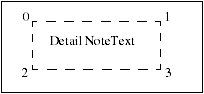
The ordering of the points is maintained even if the notes are mirrored or are at an angle.
The method pfcDetailNoteItem.GetModelReference() returns the model referenced by the parameterized text in a note. The model is referenced based on the line number and the
text index where the parameterized text appears.
Details Notes Operations
Methods Introduced:
| |
| |
| |
| |
| |
| |
The method pfcDetailNoteItem.Draw() temporarily draws a detail note item, so that it is removed during the next draft regeneration.
The method pfcDetailNoteItem.Show() displays the note item, such that it is repainted during the next draft regeneration.
The method pfcDetailNoteItem.Erase() undraws a detail note item temporarily, so that it is redrawn during the next draft regeneration.
The method pfcDetailNoteItem.Remove() undraws a detail note item permanently, so that it is not redrawn during the next draft regeneration.
The method pfcDetailNoteItem.KeepArrowTypeAsIs() allows you to keep arrow type of the leader note as it is, after a note is modified. You must call this method before the
method pfcDetailNoteItem.Modify() is called.
The method pfcDetailNoteItem.Modify() modifies the definition of an existing detail note item based on the instructions object that describes the new detail note
item.