The Basics of Web.Link
This section explains the basics of Web.Link.
Examples using Web.Link
Most of the examples include a standard header that includes some standard options on every page. The header has buttons to start, connect, and stop Creo Parametric. Some file operations are also provided. The header is a JavaScript file loaded using the following lines of HTML:
   <script src = "wl_header.js">
   document.writeln ("Error loading Web.Link header<p>");
   </script>
The first line includes the header file in your source file. If an error occurs (for example, the header file is not in the current directory), the second line causes an error message to be displayed.
Note
To avoid redundancy, the header is included but not explicitly listed in the examples themselves.
The following sections describe the header files used in the example programs:
•  wl_header.js—Contains only the JavaScript functions. This file is included in the head of the HTML page.
JavaScript Header
The header file wl_header.js is located at <creo_weblink_loadpoint>/weblinkexamples/jscript.
Note
The header wl_header.js, as well as other code in the examples, may refer to utilities which recognize the browser type:
•  pfcIsWindows for Internet Explorer
•  pfcIsMozilla for Mozilla
•  pfcIsChrome for Chromium
The code of these utilities is not shipped by PTC. If you always use a certain type of browser, for example Internet Explorer, you do not need to use these utilities, and calls to them should be removed. If you need to recognize the browser type, you have to reimplement the utilities. Please refer to the browser supplier documentation for more information.
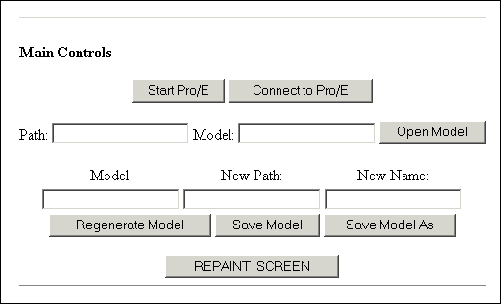
The following figure shows the header as it appears in the browser.
Image
Error Codes
Error codes are used to test the conditions in your code. You can use the Web.Link error codes as constants. This enables you to use symbolic constants in the form pwl.ErrorCode, which is a good coding practice. For example:
if (!ret.Status && ret.ErrorCode != pwl.PWL_E_NOT_FOUND)
The class pfcPWLConstants contains the following error codes:
•  PWL_NO_ERROR
•  PWL_EXEC_NOT_FOUND
•  PWL_NO_ACCESS
•  PWL_GENERAL_ERROR
•  PWL_BAD_INPUTS
•  PWL_USER_ABORT
•  PWL_E_NOT_FOUND
•  PWL_E_FOUND
•  PWL_LINE_TOO_LONG
•  PWL_CONTINUE
•  PWL_BAD_CONTEXT
•  PWL_NOT_IMPLEMENTED
•  PWL_OUT_OF_MEMORY
•  PWL_COMM_ERROR
•  PWL_NO_CHANGE
•  PWL_SUPP_PARENTS
•  PWL_PICK_ABOVE
•  PWL_INVALID_DIR
•  PWL_INVALID_FILE
•  PWL_CANT_WRITE
•  PWL_INVALID_TYPE
•  PWL_INVALID_PTR
•  PWL_UNAV_SEC
•  PWL_INVALID_MATRIX
•  PWL_INVALID_NAME
•  PWL_NOT_EXIST
•  PWL_CANT_OPEN
•  PWL_ABORT
•  PWL_NOT_VALID
•  PWL_INVALID_ITEM
•  PWL_MSG_NOT_FOUND
•  PWL_MSG_NO_TRANS
•  PWL_MSG_FMT_ERROR
•  PWL_MSG_USER_QUIT
•  PWL_MSG_TOO_LONG
•  PWL_CANT_ACCESS
•  PWL_OBSOLETE_FUNC
•  PWL_NO_COORD_SYSTEM
•  PWL_E_AMBIGUOUS
•  PWL_E_DEADLOCK
•  PWL_E_BUSY
•  PWL_NOT_IN_SESSION
•  PWL_INVALID_SELSTRING
Model and File Management
This section describes the Web.Link functions that enable you to access and manipulate models.
Model Management
Functions Introduced:
  • pfcScript.pwlMdlCurrentGet()
  • pfcScript.pwlSessionMdlsGet()
  • pfcScript.pwlMdlDependenciesGet()
  • pfcScript.pwlMdlInfoGet()
  • pfcScript.pwlMdlRegenerate()
  • To retrieve the current model in session, call the function pfcScript.pwlMdlCurrentGet(). The syntax is as follows:
       pwlMdlCurrentGet();
       Additional return fields:
          string MdlNameExt;   // The full name of the
                               // current model
    The function pfcScript.pwlSessionMdlsGet() provides a list of all the models with the specified type that are in session. The syntax is as follows:
       pwlSessionMdlsGet (
          integer    MdlType   // The type of model to list.
                               // Use parseInt with this
                               // argument.
       );
       Additional return fields:
          integer    NumMdls;  // The number of models in
                               // the list.
          string MdlNameExt[]; // The full names of the
                               // models of the specified
                               // type.
    
    The valid model types are as follows:
    •  PWL_ASSEMBLY
    •  PWL_PART
    •  PWL_DRAWING
    •  PWL_2DSECTION
    •  PWL_LAYOUT
    •  PWL_DWGFORM
    •  PWL_MFG
    •  PWL_REPORT
    •  PWL_MARKUP
    •  PWL_DIAGRAM
    The function pfcScript.pwlMdlDependenciesGet() lists all the top-level dependencies for the specified model (that is, all the models upon which the given model depends). If any of these models is an assembly, the function does not list the dependencies for that assembly. The syntax is as follows:
       pwlMdlDependenciesGet (
          string MdlNameExt    // The full name of the model
                               // whose dependencies you want
       );
       Additional return fields:
          integer NumMdls;      // The number of models in the
                                // returned array
          string  MdlNameExt[]; // The array of models upon
                                // which the specified model
                                // depends
    
    For the specified model, the function pfcScript.pwlMdlInfoGet() provides the generic name and model type. The syntax is as follows:
       pwlMdlInfoGet (
          string NameExt       // The full name of the model
       );
       Additional return fields:
          string  ImmediateGeneralName; // The immediate
                                        // general name
          string  TopGenericName;       // The top-level
                                        // generic name of
                                        // the model
          integer MdlType;              // The model type
    
    The pfcScript.pwlMdlRegenerate() function regenerates the specified model. The syntax is as follows:
       pwlMdlRegenerate (
          string MdlNameExt   // The full name of the model
       );
    
    File Management Operations
    Functions Introduced:
  • pfcScript.pwlMdlOpen()
  • pfcScript.pwlMdlSaveAs()
  • pfcScript.pwlMdlErase()
  • pfcScript.pwlMdlRename()
  • The function pfcScript.pwlMdlOpen() retrieves the specified model. The syntax is as follows:
       pwlMdlOpen (
          string  MdlNameExt,      // The full name of the
                                   // model.
          string  Path,            // The full directory
                                   // path to the model.
          boolean DisplayInWindow  // If this is true, display
                                   // the retrieved model in
                                   // a Creo Parametric window.
       );
       Additional return field:
          integer     WindowID;    // The identifier of the
                                   // window in which the
                                   // model is displayed.
    
    The Path argument is the full directory path to the model. If the model is already in memory, the function ignores this argument. If you try to open a model that is already in memory and supply an invalid Path, pfcScript.pwlMdlOpen() successfully opens the model anyway.
    If Path is an empty string, the function uses the default Creo Parametric search path.
    You can use the function pfcScript.pwlMdlOpen() to open a family table instance by specifying the name of the generic instance as the MdlNameExt argument.
    The function pfcScript.pwlMdlErase() saves the model in memory to disk, under a new name. The syntax is as follows:
       pwlMdlSaveAs (
          string OrigNameExt,  // The original name of the
                               // model, including the
                               // extension
          string NewPath,      // The new path to the model
          string NewNameExt    // The new name of the model,
                               // including the extension
       );
    Note
    Web.Link does not currently support the Creo Parametric methods of saving subcomponents under new names, so NewPath and NewNameExt are optional.
    The function pfcScript.pwlMdlErase() removes the specified model from memory. The syntax is as follows:
       pwlMdlErase (
          string MdlNameExt   // The full name of the model
                              // to erase from memory
       );
    To rename a model in memory and on disk, use the function pfcScript.pwlMdlRename(). Note that the model must be in the current directory for the model to be renamed on disk. The syntax is as follows:
       pwlMdlRename (
          string OrigNameExt,  // The original name of the
                               // model, including the
                               // extension
          string NewNameExt    // The new name of the model,
                               // including the extension
       );
    Model Items
    Functions Introduced:
  • pfcScript.pwlItemNameToID()
  • pfcScript.pwlItemIDToName()
  • pfcScript.pwlItemNameSetByID()
  • The function pfcScript.pwlItemNameToID() returns the identifier of the specified model item, given its name. The syntax is as follows:
       pwlItemNameToID (
          string  MdlNameExt,  // The full name of the model
          string  ItemName,    // The name of the model item
          integer ItemType     // The type of model item
       );
       Additional return field:
          integer ItemID;      // The identifier of the
                               // model item
    
    Similarly, to get the name of a model item given its identifier, use the function pfcScript.pwlItemIDToName(). The syntax is as follows:
       pwlItemIDToName (
          string  MdlNameExt,  // The full name of the model
          integer ItemID,      // The item identifier
          integer ItemType     // The type of model item
       );
       Additional return field:
          string  ItemName;    // The name of the model item
    You can change the name of an item using the function pfcScript.pwlItemNameSetByID() function. The syntax is as follows:
       pwlItemNameSetByID (
          string  MdlNameExt, // The full name of the model
          integer ItemID,     // The identifier of the
                              // model item
          integer ItemType,   // The type of model item
          string  ItemName    // The new name for the model
                              // item
       );
    The value of the ItemType argument should be PWL_FEATURE.
    Windows and Views
    This section describes the Web.Link functions that enable you to access and manipulate windows and views.
    Windows
    Functions Introduced:
  • pfcScript.pwlWindowRepaint()
  • pfcScript.pwlSessionWindowsGet()
  • pfcScript.pwlWindowMdlGet()
  • pfcScript.pwlWindowActiveGet()
  • pfcScript.pwlWindowActivate()
  • pfcScript.pwlWindowClose()
  • The function pfcScript.pwlWindowRepaint() repaints the window and removes highlights. Use the value –1 for the WindowID to repaint the current window. The syntax is as follows:
       pwlWindowRepaint (
          integer WindowID  // The window identifier. Use -1
                            // to repaint the current window.
                            // Use parseInt with this argument.
       );
    The function pfcScript.pwlSessionWindowsGet() provides a count and the list of window identifiers for the current Creo Parametric session. The syntax is as follows:
       pwlSessionWindowsGet();
       Additional return fields:
         integer NumWindows;  // The number of windows
         integer WindowIDs[]; // The list of window identifiers
    The function pfcScript.pwlWindowMdlGet() retrieves the model associated with the specified window. Use the value –1 for the current window. The syntax is as follows:
       pwlWindowMdlGet (
         integer WindowID       // The window identifier.
                                // Use -1 for the current
                                // window. Use parseInt with
                                // this argument.
       );
       Additional return field:
          string  MdlNameExt;   // The full name of the
                                // model associated with
                                // the specified window.
    The function pfcScript.pwlWindowActiveGet() provides the identifier of the currently active window. The syntax is as follows:
       pwlWindowActiveGet();
       Additional return field:
          integer WindowID; // The identifier of the currently
                            // active window. Use parseInt
                            // with this argument.
    The function pfcScript.pwlWindowActivate() makes the specified window active. This is equivalent to selecting Window, Activate from the Creo Parametric menu bar. The syntax is as follows:
       pwlWindowActivate (
          integer WindowID // The identifier of the window to
                           // make active. Use parseInt with
                           // this argument.
       );
    To close a window, call pfcScript.pwlWindowClose(). Use the value –1 to close the current window. The syntax is as follows:
       pwlWindowClose (
          integer WindowID // The identifier of the window
                           // to close. Use parseInt with this
                           // argument.
       );
    Note
    If you are in the middle of an operation, such as creating a feature, Creo Parametric might display a dialog box asking you to confirm the cancellation of that operation.
    Use any of the following functions to get the window identifier:
    •  pfcScript.pwlGeomSimprepOpen()
    •  pfcScript.pwlGraphicsSimprepOpen()
    •  pfcScript.pwlInstanceOpen()
    •  pfcScript.pwlMdlOpen()
    •  pfcScript.pwlSessionWindowsGet()
    •  pfcScript.pwlSimprepOpen()
    •  pfcScript.pwlWindowActiveGet()
    Views
    Functions Introduced:
  • pfcScript.pwlViewSet()
  • pfcScript.pwlViewDefaultSet()
  • pfcScript.pwlMdlViewsGet()
  • The function pfcScript.pwlMdlViewsGet() sets the view for the specified model. The syntax is as follows:
       pwlViewSet (
          string  MdlNameExt,  // The full name of the model
          string  NamedView    // The name of the view
       );
    The pfcScript.pwlViewDefaultSet() function sets the specified model to the default view for that model. The syntax is as follows:
       pwlViewDefaultSet (
          string  MdlNameExt    // The full name of the model
       );
    The function pfcScript.pwlMdlViewsGet() provides the number and names of all the views in the specified model. The syntax is as follows:
       pwlMdlViewsGet (
          string  MdlNameExt    // The full name of the model
       );
       Additional return fields:
          integer NumViews;     // The number of views
          string  ViewNames[];  // The list of view names
    Selection
    This section describes the Web.Link functions that enable you to highlight and select objects.
    Selection Functions
    Functions Introduced:
  • pfcScript.pwlSelect()
  • pfcScript.pwlSelectionCreate()
  • pfcScript.pwlSelectionParse()
  • The function pfcScript.pwlSelect() enables the user to perform interactive selection on a Creo Parametric object. The syntax is as follows:
       pwlSelect (
          string  SelectableFilter,  // The selection filter.
          integer MaxSelectable      // The maximum number
                                     // of items that can be
                                     // selected. If this is
                                     // a negative number,
                                     // there is an unlimited
                                     // number of selections.
                                     // Use parseInt with
                                     // this argument.
       );
       Additional return fields:
          integer NumSelections;     // The number of
                                     // selections made.
          string  Selections[];      // The selections.
    The valid selection filter is one or more of the following in a comma-separated list (with no spaces):
    •  “feature”
    •  “dimension”
    •  “part”
    •  “prt_or_asm”
    Any other filter option causes a PWL_GENERAL_ERROR.
    The function pfcScript.pwlSelectionCreate() creates a selection string. The function syntax is as follows:
       pwlSelectionCreate (
          string  TopModel,         // The top-level model.
          integer NumComponents,    // The number of
                                    // components in the
                                    // component path. Use
                                    // parseInt with this
                                    // argument.
          string  ComponentPath[],  // The model names for
                                    // each level of the
                                    // component path.
          integer ComponentIDs[],   // The model identifiers
                                    // for each level of the
                                    // component path. Use
                                    // parseInt with this
                                    // argument.
          integer ItemType,         // The type of selection
                                    // item. Use parseInt
                                    // with this argument.
          integer ItemID            // The identifier of
                                    // the selection item.
                                    // Use parseInt with this
                                    // argument.
       );
       Additional return field:
          string  Selection;        // The selection string.
    The “component path” is the path down from the root assembly to the model that owns the database item being referenced.
    The possible values for ItemType are as follows:
    •  PWL_DIMENSION
    •  PWL_FEATURE
    •  PWL_TYPE_UNUSED
    Note that you must always pass the TopModel. If the selection does not involve an assembly, NumComponents should be 0, and ComponentPath and ComponentIDs can be null. The ComponentIDs argument can also be null if the ComponentPath is enough to describe the selection. If ItemType and ItemID are PWL_TYPE_UNUSED, the selection will be the model itself.
    The function pfcScript.pwlSelectionParse() separates the specified selection string. The syntax is as follows:
       pwlSelectionParse (
          string  SelString         // The selection string
                                    // to parse
       );
       Addition return fields:
          string  TopModel;         // The top-level model
          integer NumComponents;    // The number of
                                    // components in the
                                    // component path
          string  ComponentPath[];  // The model names for
                                    // each level of the
                                    // component path
          integer ComponentIDs[];   // The model identifiers
                                    // for each level of the
                                    // component path
          integer ItemType;         // The type of selection
                                    // item
          integer ItemID;           // The identifier of the
                                    // selection item
    Highlighting
    Functions Introduced:
  • pfcScript.pwlItemHighlight()
  • pfcScript.pwlItemUnhighlight()
  • The function pfcScript.pwlItemHighlight() highlights the specified item, whereas pfcScript.pwlItemUnhighlight() removes the highlighting. Each function requires the full path to the item, and returns no additional fields. The syntax of the two functions is as follows:
       pwlItemHighlight (
          string  SelString    // The selection string that
                               // identifies the item
       );
    
       pwlItemUnhighlight (
          string  SelString    // The selection string that
                               // identifies the item
       );
    Parts Materials
    This chapter describes the Web.Link functions that enable you to access and manipulate part materials.
    Setting Materials
    Functions Introduced:
  • pfcScript.pwlPartMaterialCurrentGet()
  • pfcScript.pwlPartMaterialCurrentSet()
  • pfcScript.pwlPartMaterialSet()
  • pfcScript.pwlPartMaterialsGet()
  • pfcScript.pwlPartMaterialDataGet()
  • pfcScript.pwlPartMaterialDataSet()
  • The material properties functions are used to manipulate material properties and material property data for a Creo Parametric part.
    The function pfcScript.pwlPartMaterialCurrentGet() gets the name of the current material used by the specified model. (The function pfcScript.pwlPartMaterialsGet() is identical to pfcScript.pwlPartMaterialCurrentGet(), and is maintained for backward compatibility.) The syntax of the function is as follows:
       pwlPartMaterialCurrentGet (
          string  MdlNameExt    // The full name of the model
       );
       Additional return field:
          string  MaterialName; // The name of the current
                                // material
    
    To set the material for a part from a file, call the function pfcScript.pwlPartMaterialSet(). The material must be defined, or the function will fail. The syntax is as follows:
       pwlPartMaterialSet (
          string  MdlNameExt,   // The full name of the model
          string  MaterialName  // The name of the material
                                // file
       );
    To set the material for a part, call the function pfcScript.pwlPartMaterialCurrentSet(). Note that the material must already be associated with the part, or the function will fail. The syntax is as follows:
       pwlPartMaterialCurrentSet (
          string  MdlNameExt,   // The full name of the model
          string  MaterialName  // The name of the material
       );
    The function pfcScript.pwlPartMaterialsGet() provides the number and the list of all the materials used in the specified part. The syntax is as follows:
       pwlPartMaterialsGet (
          string  MdlNameExt      // The full name of the
                                  // model
       );
       Additional return fields: 
          integer NumMaterials;   // The number of materials
                                  // used in the part
          string  Materials[];    // The list of materials
    The pfcScript.pwlPartMaterialDataGet() function gets the material data for the specified part and material. The syntax is as follows:
       pwlPartMaterialdataGet (
          string  MdlNameExt,         // The full name of the
                                      // model
          string  MaterialName        // The name of the
                                      // material
       );
       Additional return fields:
          number  YoungModulus;       // The young modulus 
          number  PoissonRatio;       // The Poisson ratio
          number  ShearModulus;       // The shear modulus
          number  MassDensity;        // The mass density
          number  ThermExpCoef;       // The thermal expansion
                                      // coefficient
          number  ThermExpRefTemp;    // The thermal expansion
                                      // reference temperature
          number  StructDampCoef;     // The structural
                                      // damping coefficient
          number  StressLimTension;   // The stress limit
                                      // for tension
          number  StressLimCompress;  // The stress limit for
                                      // compression
          number  StressLimShear;     // The stress limit for
                                      // shear
          number  ThermConductivity;  // The thermal
                                      // conductivity
          number  Emissivity;         // The emissivity
          number  SpecificHeat;       // The specific heat
          number  Hardness;           // The hardness
          string  Condition;          // The condition
          number  InitBendYFactor;    // The initial bend
                                      // Y factor
          string  BendTable;          // The bend table
    
    To set the values of the material data elements, call the function pfcScript.pwlPartMaterialDataSet(). The syntax is as follows:
       pwlPartMaterialdataSet (
          string  MdlNameExt,         // The full name of the
                                      // model
          string  MaterialName,       // The name of the
                                      // material
          number  YoungModulus,       // The young modulus
          number  PoissonRatio,       // The Poisson ratio
          number  ShearModulus,       // The shear modulus
          number  MassDensity,        // The mass density
          number  ThermExpCoef,       // The thermal expansion
                                      // coefficient
          number  ThermExpRefTemp,    // The thermal expansion
                                      // reference temperature
          number  StructDampCoef,     // The structural
                                      // damping coefficient
          number  StressLimTension,   // The stress limit
                                      // for tension
          number  StressLimCompress,  // The stress limit for
                                      // compression
          number  StressLimShear,     // The stress limit for
                                      // shear
          number  ThermConductivity,  // The thermal
                                      // conductivity
          number  Emissivity,         // The emissivity
          number  SpecificHeat,       // The specific heat
          number  Hardness,           // The hardness
          string  Condition,          // The condition
          number  InitBendYFactor,    // The initial bend
                                      // Y factor
          string  BendTable           // The bend table
       );
    Assemblies
    This section describes the Web.Link functions that enable you to access assemblies and their components.
    Assembly Components
    Functions Introduced:
  • pfcScript.pwlAssemblyComponentsGet()
  • pfcScript.pwlAssemblyComponentReplace()
  • The function pfcScript.pwlAssemblyComponentsGet() provides a list of all the components in the specified assembly. This is a subset of the dependency list. (To get the entire list of dependencies, use the function pfcScript.pwlMdlDependenciesGet().) The syntax is as follows:
       pwlAssemblyComponentsGet (
          string AsmNameExt     // The full name of the 
                                // assembly
       );
       Additional return fields: 
          integer NumMdls;       // The number of components
          string  MdlNameExt[];  // The full names of the
                                 // assembly components
          integer ComponentID[]; // The array of component
                                 // identifiers
    
    The function pfcScript.pwlAssemblyComponentReplace() enables you to replace one component for another. The syntax is as follows:
       pwlAssemblyComponentReplace (
          string  AsmNameExt,         // The full name of
                                      // the assembly.
          string  NewComponentNameExt,// The full name of the
                                      // new component.
          integer NumComponentIDs,    // The number of
                                      // components to be
                                      // replaced. Use
                                      // parseInt with this
                                      // argument.
          integer ComponentIDs[])     // The identifiers of
                                      // the components to
                                      // be replaced. Use
                                      // parseInt with this
                                      // argument.
    
    The ComponentIDs argument is an array of component identifiers. If the parent has multiple occurrences of the component, this argument specifies which components to replace. The component identifiers are the feature identifiers. If this argument is an empty or null array, the function replaces all occurrences of the component.
    The pfcScript.pwlAssemblyComponentReplace() function uses the following techniques, in order of precedence:
    1. Automatic assembly from notebook mode
    2. Family table membership
    3. Interchange assembly
    Note
    If you want to use an interchange assembly, you must first load it into memory. Use the function pfcScript.pwlMdlOpen() and set the argument DisplayInWindow to false.
    Exploded Assemblies
    Functions Introduced:
  • pfcScript.pwlAssemblyExplodeStatusGet()
  • pfcScript.pwlAssemblyExplodeStatusSet()
  • pfcScript.pwlAssemblyExplodeDefaultSet()
  • pfcScript.pwlAssemblyExplodeStatesGet()
  • pfcScript.pwlAssemblyExplodeStateSet()
  • These functions deal with the explode status and explode states of assemblies. The “explode status” specifies whether the given assembly is exploded, whereas the “explode state” describes what the assembly looks like when it is exploded.
    The function pfcScript.pwlAssemblyExplodeStatusGet() provides the explode status of the specified assembly. The ExplodeStatus is a Boolean value. If it is true, the assembly is exploded.
    The syntax is as follows:
       pwlAssemblyExplodeStatusGet (
          string  AsmNameExt     // The full name of the
                                 // assembly.
       );
       Additional return field: 
          boolean ExplodeStatus; // If this is true, the
                                 // assembly is exploded.
    
    Similarly, the pfcScript.pwlAssemblyExplodeStatusSet() function enables you to set the explode status for the specified assembly. The syntax is as follows:
       pwlAssemblyExplodeStatusSet (
          string  AsmNameExt,     // The full name of the
                                  // assembly
          boolean ExplodeStatus   // The new explode status
       );
    The function pfcScript.pwlAssemblyExplodeStatusSet() sets the assembly’s explode state to use the default component locations. The syntax is as follows:
       pwlAssemblyExplodeDefaultSet (
          string AsmNameExt   // The full name of the assembly
       );
    The function pfcScript.pwlAssemblyExplodeStatusSet() provides the number and list of explode states for the specified assembly. The syntax is as follows:
       pwlAssemblyExplodeStatesGet (
          string  AsmNameExt         // The full name of the
                                     // assembly
       );
       Additional return fields: 
          integer NumExpldstates;    // The number of explode
                                     // states
          string  ExpldstateNames[]; // The names of the 
                                     // explode states
    To set the explode state for a given assembly, call the function pfcScript.pwlAssemblyExplodeStatusSet(). The syntax is as follows:
       pwlAssemblyExplodeStateSet (
          string AsmNameExt,      // The full name of the
                                  // assembly
          string ExpldstateName   // The name of a predefined
                                  // explode state
       );
    Features
    This section describes the Web.Link functions that enable you to access and manipulate features in Creo Parametric.
    Feature Inquiry
    Functions Introduced:
  • pfcScript.pwlMdlFeaturesGet()
  • pfcScript.pwlFeatureInfoGetByID()
  • pfcScript.pwlFeatureInfoGetByName()
  • pfcScript.pwlFeatureParentsGet()
  • pfcScript.pwlFeatureChildrenGet()
  • pfcScript.pwlFeatureStatusGet()
  • The pfcScript.pwlMdlFeaturesGet() function returns all the features that are known to the end user, including suppressed features. The syntax is as follows:
       pwlMdlFeaturesGet (
          string  MdlNameExt,   // The full name of the model.
          integer FeatureType   // The type of feature to
                                // list. Use parseInt with
                                // this argument.
       );
       Additional return fields: 
          integer NumFeatures;  // The number of features.
          integer FeatureIDs[]; // The list of feature
                                // identifiers.
    
    Use –1 for the FeatureType argument to get a list of all the features. See the section Pro/Web.Link Constants for a complete list of the possible feature types.
    The function pfcScript.pwlFeatureInfoGetByID() gets the information about the specified feature, given its identifier. The syntax is as follows:
       pwlFeatureInfoGetByID (
          string  MdlNameExt,   // The full name of the model.
          integer FeatureID     // The feature identifier.
                                // Use parseInt with this
                                // argument.
       );
       Additional return fields:
          integer FeatureType;   // The feature type.
          integer FeatureID;     // The feature identifier.
          string  FeatureName;   // The name of the feature.
          string  FeatTypeName;  // The string name of the
                                 // feature type, such as 
                                 // "Hole."
    The pfcScript.pwlFeatureInfoGetByName() is identical to pfcScript.pwlFeatureInfoGetByID(), except you specify the name of the feature instead of its identifier. The syntax is as follows:
       pwlFeatureInfoGetByName (
          string MdlNameExt,    // The full name of the model
          string FeatureName    // The name of the feature
       );
       Additional return fields:
          integer FeatureType;   // The feature type
          integer FeatureID;     // The feature identifier
          string  FeatureName;   // The name of the feature
          string  FeatTypeName;  // The string name of the
                                 // feature type, such as
                                 // "Hole"
    To get the parents of a feature, call the function pfcScript.pwlFeatureParentsGet(). The syntax is as follows:
       pwlFeatureParentsGet (
          string  MdlNameExt,    // The full name of the model.
          integer FeatureID      // The identifier of the
                                 // child feature. Use
                                 // parseInt with this
                                 // argument.
       );
       Additional return fields: 
          integer NumParents;   // The number of parents.
          integer ParentIDs[];  // The list of feature
                                // identifiers for the
                                // parents.
    
    Similarly, the function pfcScript.pwlFeatureChildrenGet() provides the children of the specified feature. The syntax is as follows:
       pwlFeatureChildrenGet (
           string  MdlNameExt,   // The full name of the model.
           integer FeatureID     // The identifier of the
                                 // parent feature. Use
                                 // parseInt with this
                                 // argument.
       );
       Additional return fields:
           integer NumChildren; // The number of children.
           integer ChildIDs[];  // The list of feature
                                // identifiers for the
                                // children.
    The function pfcScript.pwlFeatureStatusGet() gets the status of the specified feature. The syntax is as follows:
       pwlFeatureStatusGet (
          string  MdlNameExt,  // The full name of the model.
          integer FeatureID    // The feature identifier.
                               // Use parseInt with this
                               // argument.
       );
       Additional return fields: 
          integer FeatureStatus;       // The feature status.
          integer PatternStatus;       // The pattern status.
          integer GroupStatus;         // The group status.
          integer GroupPatternStatus;  // The group pattern
                                       // status.
    
    The return fields are as follows:
    •  FeatureStatus—The feature status. The defined constants are as follows:
      PWL_FEAT_ACTIVE—An ordinary feature.
      PWL_FEAT_INACTIVE—A feature that is not suppressed, but is not currently in use for another reason. For example, a family table instance that excludes this feature.
      PWL_FEAT_FAMTAB_SUPPRESSED—A feature suppressed by family table functionality.
      PWL_FEAT_SIMP_REP_SUPPRESSED—A feature suppressed by simplified representation functionality.
      PWL_FEAT_PROG_SUPPRESSED—A feature suppressed by Pro/PROGRAMTM functionality.
      PWL_FEAT_SUPPRESSED—A suppressed feature.
      PWL_FEAT_UNREGENERATED—A feature that is active, but not regenerated due to a regeneration failure that has not been fixed. This regeneration failure might result from an earlier feature.
    •  PatternStatus—The pattern status. The defined constants are as follows:
      PWL_NONE—The feature is not in a pattern.
      PWL_LEADER—The feature is the leader of a pattern.
      PWL_MEMBER—The feature is a member of the pattern.
    •  GroupStatus—The group status. The defined constants are as follows:
      PWL_NONE—The feature is not in a group pattern.
      PWL_MEMBER—The feature is in a group that is a group pattern member.
    •  GroupPatternStatus—The group pattern status. The defined constants are as follows:
      PWL_NONE—The feature is not in a group pattern.
      PWL_LEADER—The feature is the leader of the group pattern.
      PWL_MEMBER—The feature is a member of the group pattern.
    Feature Names
    Functions Introduced:
  • pfcScript.pwlFeatureNameGetByID()
  • pfcScript.pwlFeatureNameSetByID()
  • The function pfcScript.pwlFeatureNameGetByID() provides the name of the specified feature, given its identifier. The syntax is as follows:
       pwlFeatureNameGetByID (
          string  MdlNameExt,   // The full name of the model.
          integer FeatureID     // The feature identifier. Use
                                // parseInt with this 
                                // argument.
       );
       Additional return field:
          string FeatureName;   // The name of the feature.
    
    To change the name of a feature, use the function pfcScript.pwlFeatureNameSetByID(). The syntax is as follows:
       pwlFeatureNameSetByID (
          string  MdlNameExt,   // The full name of the model.
          integer FeatureID,    // The feature identifier.
                                // Use parseInt with this
                                // argument.
          string  FeatureName   // The new name of the
                                // feature.
       );
    Manipulating Features
    The following sections describe the Web.Link functions that enable you to suppress, resume, and delete features.
    Suppressing Features
    Functions Introduced:
  • pfcScript.pwlFeatureSuppressByID()
  • pfcScript.pwlFeatureSuppressByIDList()
  • pfcScript.pwlFeatureSuppressByLayer()
  • pfcScript.pwlFeatureSuppressByName()
  • These functions enable you to suppress features by specifying their identifiers, identifier lists, layers, or names. The syntax for the functions is as follows:
       pwlFeatureSuppressByID (
           string  MdlNameExt,   // The full name of the model.
           integer FeatureID     // The identifier of the
                                 // feature to suppress. Use
                                 // parseInt with this
                                 // argument.
       );
       pwlFeatureSuppressByIDList (
           string  MdlNameExt,   // The full name of the model.
           integer NumFeatures,  // The number of feature
                                 // identifiers in the list.
                                 // Use parseInt with this
                                 // argument.
           integer FeatureIDs[]  // The list of identifiers
                                 // of features to suppress.
                                 // Use parseInt with this
                                 // argument.
       );
       pwlFeatureSuppressByLayer (
           string MdlNameExt,   // The full name of the model
           string LayerName     // The name of the layer
                                // to suppress
       );
       pwlFeatureSuppressByName (
           string MdlNameExt,   // The full name of the
                                // model
           string FeatureName   // The name of the feature
                                // to suppress
       );
    Resuming Features
    Functions Introduced:
  • pfcScript.pwlFeatureResumeByID()
  • pfcScript.pwlFeatureResumeByIDList()
  • pfcScript.pwlFeatureResumeByLayer()
  • pfcScript.pwlFeatureResumeByName()
  • These functions alow you to resume features by specifying their identifiers, identifier lists, layers, or names. These functions take the additional argument ResumeParents, of type Boolean. If you set this argument to true, the functions also resume the parents of the specified feature, if they are suppressed.
    The syntax of the functions is as follows:
       pwlFeatureResumeByID (
          string  MdlNameExt,     // The full name of the
                                  // model.
          integer FeatureID,      // The identifier of the
                                  // feature to resume. Use
                                  // parseInt with this
                                  // argument.
          boolean ResumeParents   // Specifies whether to
                                  // resume the parents of
                                  // the feature.
       );
    
       pwlFeatureResumeByIDList (
          string  MdlNameExt,     // The full name of the 
                                  // model.
          integer NumFeatures,    // The number of identifiers
                                  // in the list. Use parseInt
                                  // with this argument.
          integer FeatureIDs[],   // The list of identifiers
                                  // of features to resume.
                                  // Use parseInt with this
                                  // argument.
          boolean ResumeParents   // Specifies whether to
                                  // resume the parents of
                                  // the features.
       );
    
       pwlFeatureResumeByLayer (
          string  MdlNameExt,     // The full name of the
                                  // model
          string  LayerName,      // The name of the layer
                                  // to resume
          boolean ResumeParents   // Specifies whether to
                                  // resume the parents of
                                  // the features
       );
    
       pwlFeatureResumeByName (
          string  MdlNameExt,     // The full name of the 
                                  // model
          string  FeatureName,    // The name of the feature
                                  // to resume
          boolean ResumeParents   // Specifies whether to
                                  // resume the parents of
                                  // the feature
       );
    Deleting Features
    Functions Introduced:
  • pfcScript.pwlFeatureDeleteByID()
  • pfcScript.pwlFeatureDeleteByIDList()
  • pfcScript.pwlFeatureDeleteByLayer()
  • pfcScript.pwlFeatureDeleteByName()
  • These functions enable you to delete features by specifying their identifiers, identifier lists, layers, or names.
    Note
    If the feature has children, the children are also deleted.
    The syntax of the functions is as follows:
       pwlFeatureDeleteByID (
          string  MdlNameExt,  // The full name of the model.
          integer FeatureID    // The identifier of the
                               // feature to delete. Use
                               // parseInt with this
                               // argument.
       );
       pwlFeatureDeleteByIDList (
          string  MdlNameExt,   // The full name of the model.
          integer NumFeatures,  // The number of identifiers
                                // in the list. Use parseInt
                                // with this argument.
          integer FeatureIDs[]  // The list of identifiers
                                // of features to delete. Use
                                // parseInt with this
                                // argument.
       );
       pwlFeatureDeleteByLayer (
          string MdlNameExt,   // The full name of the model
          string LayerName     // The name of the layer to
                               // delete
       );
       pwlFeatureDeleteByName (
          string MdlNameExt,   // The full name of the model
          string FeatureName   // The name of the feature
                               // to delete
       );
    Displaying Parameters
    Function introduced:
  • pfcScript.pwlFeatureParametersDisplay()
  • The function pfcScript.pwlFeatureParametersDisplay() shows the specified parameter types for a feature in the graphics window. The syntax is as follows:
       pwlFeatureParametersDisplay (
          string  SelString, // The selection string that
                             // identifies the feature.
          integer ItemType   // The type of parameter to
                             // display. Use parseInt with
                             // this argument.
       );
    The possible values for ItemType are as follows:
    •  PWL_USER_PARAM
    •  PWL_DIM_PARAM
    •  PWL_PATTERN_PARAM
    •  PWL_REFDIM_PARAM
    •  PWL_ALL_PARAMS
    •  PWL_GTOL_PARAM
    •  PWL_SURFFIN_PARAM
    Parameters
    This section describes the Web.Link functions that enable you to access and manipulate user parameters.
    Listing Parameters
    Functions Introduced:
  • pfcScript.pwlMdlParametersGet()
  • pfcScript.pwlFeatureParametersGet()
  • The function pfcScript.pwlMdlParametersGet() retrieves all model parameters, given the name of the model. This does not include parameters on a feature. The syntax is as follows:
       pwlMdlParametersGet (
          string  MdlNameExt     // The full name of the model
       );
       Additional return fields: 
          integer NumParams;     // The number of parameters
                                 // in the array ParamNames
          string  ParamNames[];  // The list of parameter
                                 // names
    
    The function pfcScript.pwlFeatureParametersGet() retrieves the parameters for the specified feature. The syntax is as follows:
       pwlFeatureParametersGet (
           string  MdlNameExt,   // The full name of the
                                 // model (part or assembly).
           integer FeatureID     // The identifier for which
                                 // parameters should be
                                 // found. Use parseInt with
                                 // this argument.
       );
       Additional return fields:
           integer NumParams;    // The number of parameters
                                 // in the array ParamNames.
           string  ParamNames[]; // The list of parameter
                                 // names.
    
    Note
    This function applies only to parts and assemblies.
    Identifying Parameters
    Uniquely identifying a parameter requires more than the model and parameter names because the parameter name could be used by the model and several features. Therefore, two additional arguments are required for all parameter functions—the item type and item identifier. The item type is either PWL_FEATURE or PWL_MODEL.
    The item identifier does not apply to model parameters, but contains the feature identifier for feature parameters. The item identifier must be an integer value even if it is not used.
    Reading and Modifying Parameters
    Functions Introduced:
  • pfcScript.pwlParameterValueGet()
  • pfcScript.pwlParameterValueSet()
  • pfcScript.pwlParameterCreate()
  • pfcScript.pwlParameterDelete()
  • pfcScript.pwlParameterRename()
  • pfcScript.pwlParameterReset()
  • To retrieve the value of a parameter, use the function pfcScript.pwlParameterValueGet(). The syntax is as follows:
       pwlParameterValueGet (
          string  MdlNameExt,       // The full name of the
                                    // model.
          integer ItemType,         // Specifies whether it
                                    // is a model (PWL_MODEL)
                                    // or a feature parameter
                                    // (PWL_FEATURE). Use
                                    // parseInt with this
                                    // argument.
          integer ItemID,           // The feature identifier.
                                    // This is unused for
                                    // model parameters. Use
                                    // parseInt with this
                                    // argument.
          string  ParamName         // The name of the
                                    // parameter.
       );
       Additional return fields:
          integer ParamType;        // Specifies the data
    The function returns five additional fields, but only two will be set. The field ParamType is always set, and its value determines what other field should be used, according to the following table.
    Value of the ParamType
    Additional Fields
    PWL_VALUE_INTEGER
    ParamIntVal
    PWL_VALUE_DOUBLE
    ParamDoubleVal
    PWL_VALUE_STRING
    ParamStringVal
    PWL_VALUE_BOOLEAN
    ParamBooleanVal
    The following code fragment shows how to use this function.
    <script language = "JavaScript">
    function WlParameterGetValue()
    {
      var mdl_ret = document.pwl.pwlMdlInfoGet (
          document.get_value.ModelNameExt.value);
      if (!mdl_ret.Status)
      {
        alert ("pwlMdlInfoGet failed (" + mdl_ret.ErrorCode + ")");
        return;
      }
      var ret = document.pwl.pwlParameterValueGet (
          document.get_value.ModelNameExt.value, parseInt (mdl_ret.MdlType),
          0 /* unused */, document.get_value.ParamName.value);
      if (!ret.Status)
      {
        alert ("pwlParameterValueGet failed (" + ret.ErrorCode + ")");
        return;
      }
      if (ret.ParamType == parseInt (document.pwl.PWL_VALUE_DOUBLE))
      {
        document.get_value.Value.value = ret.ParamDoubleVal;
      }
      else if (ret.ParamType == parseInt (document.pwl.PWL_VALUE_STRING))
      {
        document.get_value.Value.value = ret.ParamStringVal;
      }
      else if (ret.ParamType == parseInt (document.pwl.PWL_VALUE_INTEGER))
      {
        document.get_value.Value.value = ret.ParamIntVal;
      }
      else if (ret.ParamType == parseInt (document.pwl.PWL_VALUE_BOOLEAN))
      {
        document.get_value.Value.value = ret.ParamBooleanVal;
      }
    }
    </script>
    
    <form name = "get_value">
    <h4>Get a Value for a Parameter (Model Parameters Only)</h4>
    <p>
    <center>
    <!-- Input arguments -->
    Model: <input type = "text" name = "ModelNameExt">
    Parameter: <input type = "text" name = "ParamName">
    <p>
    <!-- Buttons -->
    <input type = "button" value = "Get Value"
         onclick = "WlParameterGetValue()">
    <p>
    <!-- Output arguments -->
    Value: <input type = "text" name = "Value">
    </center>
    <hr>
    </form>
    Setting a parameter using the function pfcScript.pwlParameterValueSet() requires several arguments to allow for all the possibilities. The syntax is as follows:
       pwlParameterValueSet (
          string  MdlNameExt, // The full name of the model.
          integer ItemType,   // Specifies whether it is a
                              // model (PWL_MODEL) or a
                              // feature parameter
                              // (PWL_FEATURE). Use parseInt
                              // with this argument.
          integer ItemID,     // The feature identifier.
                              // This is unused for model
                              // parameters. Use parseInt
                              // with this argument.
          string  ParamName,  // The name of the parameter.
          integer ValueType,  // Specifies the data type of
                              // the value. Use parseInt
                              // with this argument.
          integer IntVal,     // The integer value. Use
                              // parseInt with this argument.
          number  DoubleVal,  // The number value. Use
                              // parseFloat with this
                              // argument.
          string  StringVal,  // The string value.
          Boolean BooleanVal  // The Boolean value.
       );
    The value of ValueType determines which of the other four values will be used. Although only one of IntVal, DoubleVal, StringVal, and BooleanVal will be used, all must be the proper data types or an error will occur.
    Creating and setting parameters are very similar. The function pfcScript.pwlParameterCreate() takes the same arguments and has the same return fields as pfcScript.pwlParameterValueSet(). However, creation fails if the parameter already exists, whereas setting the value succeeds only on existing parameters.
    The following code fragment shows how to create a string parameter.
    <script language = "JavaScript">
    function WlParameterCreate()
    {
      var mdl_ret = document.pwl.pwlMdlInfoGet (
          document.create.ModelNameExt.value);
      if (!mdl_ret.Status)
      {
        alert ("pwlMdlInfoGet failed (" + mdl_ret.ErrorCode + ")");
        return;
      }
      var ret = document.pwl.pwlParameterCreate (
          document.create.ModelNameExt.value, parseInt (mdl_ret.MdlType),
          0 /* unused */, document.create.ParamName.value,
          parseInt (document.pwl.PWL_VALUE_STRING), 0 /* unused */,
          0.0 /* unused */, document.create.Value.value, false /* unused */);
      if (!ret.Status)
      {
        alert ("pwlParameterCreate failed (" + ret.ErrorCode + ")");
        return;
      }
    }
    </script>
    
    <form name = "create">
    <h4>Create Parameter (Model Parameter with string Value Only)</h4>
    <p>
    <center>
    <!-- Input arguments -->
    Model: <input type = "text" name = "ModelNameExt">
    Parameter: <input type = "text" name = "ParamName">
    Value: <input type = "text" name = "Value">
    <p>
    <!-- Buttons -->
    <input type = "button" value = "Create Parameter"  
    onclick = "WlParameterCreate()">
    <p>
    </center>
    <hr>
    </form>
    The function pfcScript.pwlParameterDelete() deletes the specified parameter. The syntax is as follows:
       pwlParameterDelete (
          string  MdlNameExt,   // The full name of the
                                // model.
          integer ItemType,     // Specifies whether it is
                                // a model (PWL_MODEL) or
                                // a feature parameter
                                // (PWL_FEATURE). Use
                                // parseInt with this
                                // argument.
          integer ItemID,       // The feature identifier.
                                // This is unused for model
                                // parameters. Use parseInt
                                // with this argument.
          string  ParamName     // The name of the parameter.
       );
    To rename a parameter, call the pfcScript.pwlParameterRename() function. The syntax is as follows:
       pwlParameterRename (
          string  MdlNameExt,   // The full name of the
                                // model.
          integer ItemType,     // Specifies whether it is
                                // a model (PWL_MODEL) or
                                // a feature parameter
                                // (PWL_FEATURE). Use
                                // parseInt with this
                                // argument.
          integer ItemID,       // The feature identifier.
                                // This is unused for model
                                // parameters. Use parseInt
                                // with this argument.
          string  ParamName,    // The old name of the
                                // parameter.
          string  NewName       // The new name of the
                                // parameter.
       );
    The function pfcScript.pwlParameterReset() restores the parameter's value to the one it had at the end of the last regeneration. The syntax is as follows:
       pwlParameterReset (
          string  MdlNameExt,   // The full name of the
                                // model.
          integer ItemType,     // Specifies whether it is
                                // a model (PWL_MODEL) or
                                // a feature parameter
                                // (PWL_FEATURE). Use
                                // parseInt with this
                                // argument.
          integer ItemID,       // The feature identifier.
                                // This is unused for model
                                // parameters. Use parseInt
                                // with this argument.
          string  ParamName     // The name of the parameter.
       );
    Designating Parameters
    Functions Introduced:
  • pfcScript.pwlParameterDesignationAdd()
  • pfcScript.pwlParameterDesignationRemove()
  • pfcScript.pwlParameterDesignationVerify()
  • These functions control the designation of model parameters for Windchill. A designated parameter will become visible within Windchill as an attribute when the model is next submitted.
    The function pfcScript.pwlParameterDesignationAdd() designates an existing parameter. The syntax is as follows:
       pwlParameterDesignationAdd (
          string  MdlNameExt,  // The full name of the model
          string  ParamName    // The name of the parameter
       );
    The pfcScript.pwlParameterDesignationRemove() function removes the designation. The syntax is as follows:
       pwlParameterDesignationAdd (
          string  MdlNameExt,  // The full name of the model
          string  ParamName    // The name of the parameter
       );
    To verify whether a parameter is currently designated, call pfcScript.pwlParameterDesignationVerify(). The syntax is as follows:
       pwlParameterDesignationVerify (
          string  MdlNameExt,  // The full name of the model.
          string  ParamName    // The name of the parameter.
       );
       Additional return field: 
          boolean Exists;      // If this is true, the
                               // parameter is currently
                               // designated.
    Parameter Example
    The following example shows how to use the Web.Link parameter functions.
    <html xmlns:v="urn:schemas-microsoft-com:vml"
    xmlns:o="urn:schemas-microsoft-com:office:office"
    xmlns:w="urn:schemas-microsoft-com:office:word"
    xmlns="http://www.w3.org/TR/REC-html40">
    
    <head>
    <meta http-equiv=Content-Type content="text/html; charset=us-ascii">
    <meta name=ProgId content=Word.Document>
    <meta name=Generator content="Microsoft Word 9">
    <meta name=Originator content="Microsoft Word 9">
    <link rel=File-List href="./parameters_files/filelist.xml">
    <link rel=Edit-Time-Data href="./parameters_files/editdata.mso">
    <!--[if !mso]>
    <style>
    v\:* {behavior:url(#default#VML);}
    o\:* {behavior:url(#default#VML);}
    w\:* {behavior:url(#default#VML);}
    .shape {behavior:url(#default#VML);}
    </style>
    <![endif]-->
    
    <title>Web.Link Parameters Test</title>
    <!--[if gte mso 9]><xml>
     <o:DocumentProperties>
      <o:Author>Scott Conover</o:Author>
      <o:LastAuthor>Scott Conover</o:LastAuthor>
      <o:Revision>5</o:Revision>
      <o:TotalTime>7</o:TotalTime>
      <o:Created>2002-11-22T15:28:00Z</o:Created>
      <o:LastSaved>2002-11-22T15:46:00Z</o:LastSaved>
      <o:Pages>1</o:Pages>
      <o:Words>151</o:Words>
      <o:Characters>863</o:Characters>
      <o:Company>PTC</o:Company>
      <o:Lines>7</o:Lines>
      <o:Paragraphs>1</o:Paragraphs>
      <o:CharactersWithSpaces>1059</o:CharactersWithSpaces>
      <o:Version>9.3821</o:Version>
     </o:DocumentProperties>
    </xml><![endif]-->
    <style>
    <!--
     /* Style Definitions */
    p.MsoNormal, li.MsoNormal, div.MsoNormal
         {mso-style-parent:"";
         margin:0in;
         margin-bottom:.0001pt;
         mso-pagination:widow-orphan;
         font-size:12.0pt;
         font-family:"Times New Roman";
         mso-fareast-font-family:"Times New Roman";}
    p
         {margin-right:0in;
         mso-margin-top-alt:auto;
         mso-margin-bottom-alt:auto;
         margin-left:0in;
         mso-pagination:widow-orphan;
         font-size:12.0pt;
         font-family:"Times New Roman";
         mso-fareast-font-family:"Times New Roman";}
    @page Section1
         {size:8.5in 11.0in;
         margin:1.0in 1.25in 1.0in 1.25in;
         mso-header-margin:.5in;
         mso-footer-margin:.5in;
         mso-paper-source:0;}
    div.Section1
         {page:Section1;}
    -->
    </style>
    
    <script  src="../jscript/pfcUtils.js">
    </script>
    
    <script  src="../jscript/wl_header.js">
    </script>
    
    <script>
    
    function WlParametersGet()
    //     Get the parameter list from the model or feature.
    {
        var ret;
        var FunctionName;
        var ItemType;
         var FeatureID;
    
        if (document.list_parm.ModelNameExt.value == "")
        {
            return ;
        }
        ItemType = document.pwl.eval(document.list_parm.ParmType.options[
                       document.list_parm.ParmType.selectedIndex].value);
        if (parseInt(ItemType) == parseInt(document.pwlc.PWL_FEATURE))
        {
            if (document.list_parm.FeatureID.value == "")
            {
                return ;
            }
    
              FeatureID = parseInt(document.list_parm.FeatureID.value);
              if (isNaN (FeatureID))
              {
                   alert ("Invalid feature ID!");
                   return;
              }
            ret = document.pwl.pwlFeatureParametersGet(
                      document.list_parm.ModelNameExt.value,
                      parseInt(document.list_parm.FeatureID.value));
            FunctionName = "pwlFeatureParametersGet";
        }
        else
        {
              FeatureID = -1;
            ret = document.pwl.pwlMdlParametersGet(
                      document.list_parm.ModelNameExt.value);
            FunctionName = "pwlMdlParametersGet";
        }
        if (!ret.Status)
        {
            alert(FunctionName + " failed (" + ret.ErrorCode + ")");
            return ;
        }
        document.list_parm.Parameters.value = "";
        for (var i = 0; i < ret.NumParams; i++)
        {
            var val_ret = document.pwl.pwlParameterValueGet(
                              document.list_parm.ModelNameExt.value,
                              parseInt(ItemType),
                              FeatureID,
                              ret.ParamNames.Item(i));
            if (!val_ret.Status)
            {
                alert("pwlParameterValueGet failed (" + val_ret.ErrorCode + ")");
                return ;
            }
            var answer = "Undefined";
            if (val_ret.ParamType == parseInt(document.pwlc.PWL_VALUE_DOUBLE))
            {
                answer = val_ret.ParamDoubleVal;
            }
            else if (val_ret.ParamType == parseInt(document.pwlc.PWL_VALUE_STRING))
            {
                answer = val_ret.ParamStringVal;
            }
            else if (val_ret.ParamType == parseInt(document.pwlc.PWL_VALUE_INTEGER))
            {
                answer = val_ret.ParamIntVal;
            }
            else if (val_ret.ParamType == parseInt(document.pwlc.PWL_VALUE_BOOLEAN))
            {
                answer = (val_ret.ParamBooleanVal) ? "true" : "false";
            }
            document.list_parm.Parameters.value += ret.ParamNames.Item(i) + ": " +
                                                   answer +"\n";
        }
    }
    
    function WlParameterSetValue(FunctionName)
    //     Set a parameter or create a new parameter, depending on the function 
    //      name.
    {
        var ItemType;
        var StringValue = document.set_value.Value.value;
        var FloatValue = parseFloat(document.set_value.Value.value);
        var IntValue = parseInt(document.set_value.Value.value);
        var BoolValue = (document.set_value.Value.value.toLowerCase() == "true") ?
                        true : false;
        var ValueType = document.pwl.eval(document.set_value.ValueType.options[
                              document.set_value.ValueType.selectedIndex].value);
    
        // In order to create usable trail file FloatValue cannot be NaN
        if (isNaN(FloatValue))
        {
            FloatValue = 1.1;
        }
         if (isNaN (IntValue))
         {
              IntValue = -5;
         }
              
        ItemType = document.pwl.eval(document.set_value.ParmType.options[
                       document.set_value.ParmType.selectedIndex].value);
         if (ItemType == document.pwlc.PWL_MODEL)
              featureID = -1;
         else
              featureID = parseInt(document.set_value.FeatureID.value);
    
         if (FunctionName == "pwlParameterCreate")
         {
              
             var ret = document.pwl.pwlParameterCreate (
                      document.set_value.ModelNameExt.value,
                      ItemType,
                      featureID,
                      document.set_value.Parameter.value, ValueType,
                      IntValue, FloatValue, StringValue, BoolValue);
         }
         else
         {
              var ret = document.pwl.pwlParameterValueSet (
                             document.set_value.ModelNameExt.value,
                      ItemType,
                      featureID,
                      document.set_value.Parameter.value, ValueType,
                      IntValue, FloatValue, StringValue, BoolValue);
         }
    
        if (!ret.Status)
        {
            alert(FunctionName + " failed (" + ret.ErrorCode + ")");
            return ;
        }
    }
    
    function WlParameterMisc(FunctionName)
    //     Run miscellaneous parameter functions that take only model name,
    //     item type, item ID, and parameter name as arguments.
    {
        var ItemType;
    
        ItemType = document.pwl.eval(document.misc_parm.ParmType.options[
                       document.misc_parm.ParmType.selectedIndex].value);
         if (ItemType == document.pwlc.PWL_MODEL)
         {
              FeatureID = -1;
         }
         else
         {
              FeatureID = parseInt(document.misc_parm.FeatureID.value);
              if (isNaN (FeatureID))
                   {
                        alert ("Invalid feature id: "+FeatureID);
                        return;
                   }
         }
       if (FunctionName == "pwlParameterReset")
         {          
             var ret = document.pwl.pwlParameterReset(
                      document.misc_parm.ModelNameExt.value,
                      ItemType,
                      FeatureID,
                      document.misc_parm.Parameter.value);
         }
         else
         {
              var ret = document.pwl.pwlParameterDelete(
                      document.misc_parm.ModelNameExt.value,
                      ItemType,
                      FeatureID,
                      document.misc_parm.Parameter.value);
    
         }
    
        if (!ret.Status)
        {
            alert(FunctionName + " failed (" + ret.ErrorCode + ")");
            return ;
        }
    }
    
    function WlParameterRename()
    //     Rename a parameter.
    {
        var ItemType;
    
        ItemType = document.pwl.eval(document.misc_parm.ParmType.options[
                       document.misc_parm.ParmType.selectedIndex].value);
         if (ItemType == document.pwlc.PWL_MODEL)
         {
              FeatureID = -1;
         }
         else
         {
              FeatureID = parseInt(document.misc_parm.FeatureID.value);
              if (isNaN (FeatureID))
                   {
                        alert ("Invalid feature id: "+FeatureID);
                        return;
                   }
         }
    
    
        var ret = document.pwl.pwlParameterRename(
                      document.misc_parm.ModelNameExt.value,
                      ItemType,
                      FeatureID,
                      document.misc_parm.Parameter.value,
                      document.misc_parm.NewName.value);
        if (!ret.Status)
        {
            alert("pwlParameterRename failed (" + ret.ErrorCode + ")");
            return ;
        }
    }
    
    function WlParameterDesignate(FunctionName)
    //     Run designate parameter functions that take only the model name
    //     and parameter name as arguments and don't return anything.
    {
     if (FunctionName == "pwlParameterDesignationAdd")
         {
        var ret = document.pwl.pwlParameterDesignationAdd(
                      document.desg_parm.ModelNameExt.value,
                      document.desg_parm.Parameter.value);
         }
         else
         {
                var ret = document.pwl.pwlParameterDesignationRemove(
                      document.desg_parm.ModelNameExt.value,
                      document.desg_parm.Parameter.value);
         }
    
        if (!ret.Status)
        {
            alert(FunctionName + " failed (" + ret.ErrorCode + ")");
            return ;
        }
    }
    
    function WlParameterVerifyDesignation()
    //     Verify that a parameter has been designated.
    {
        var ret = document.pwl.pwlParameterDesignationVerify(
                      document.desg_parm.ModelNameExt.value,
                      document.desg_parm.Parameter.value);
        if (!ret.Status)
        {
            alert("pwlParameterDesignationVerify failed (" + ret.ErrorCode + ")");
            return ;
        }
        document.desg_parm.Exist.value = ret.Exists;
    }
    
    function NotApplicable(form)
    //     Print N\A in the feature ID field when a model is selected.
    {
        if (form.ParmType.options[form.ParmType.selectedIndex].value == "PWL_MODEL")
        {
            form.FeatureID.value = "N\\A";
        }
        else if (form.FeatureID.value == "N\\A")
        {
            form.FeatureID.value = "";
        }
    }
    </script>
    <!--[if gte mso 9]><xml>
     <o:shapedefaults v:ext="edit" spidmax="1027"/>
    </xml><![endif]--><!--[if gte mso 9]><xml>
     <o:shapelayout v:ext="edit">
      <o:idmap v:ext="edit" data="1"/>
     </o:shapelayout></xml><![endif]-->
    </head>
    
    <body lang=EN-US style='tab-interval:.5in'>
    <div class=Section1>
    <form name="list_parm">
    <h4>List Parameters<o:p></o:p></h4>
    <div align=center>
    <table border=0 cellpadding=0 style='mso-cellspacing:1.5pt;mso-padding-alt:
     0in 0in 0in 0in'>
     <tr>
      <td style='padding:.75pt .75pt .75pt .75pt'>
      <p align=center style='text-align:center'><!-- Input arguments -->Model:</p>
      </td>
      <td style='padding:.75pt .75pt .75pt .75pt'>
      <p align=center style='text-align:center'>Display:</p>
      </td>
      <td style='padding:.75pt .75pt .75pt .75pt'>
      <p align=center style='text-align:center'>Feature ID:</p>
      </td>
     </tr>
     <tr>
      <td style='padding:.75pt .75pt .75pt .75pt'>
      <p class=MsoNormal align=center style='text-align:center'>
    <INPUT TYPE="text" SIZE="20" NAME="ModelNameExt"><o:p></o:p></p>
      </td>
      <td style='padding:.75pt .75pt .75pt .75pt'>
      <p class=MsoNormal align=center style='text-align:center'><SELECT NAME="ParmType"
      onchange="NotApplicable(document.list_parm)">
    <OPTION SELECTED VALUE="PWL_MODEL">By Model
    <OPTION VALUE="PWL_FEATURE">By Feature ID
    </SELECT></p>
      </td>
      <td style='padding:.75pt .75pt .75pt .75pt'>
      <p class=MsoNormal align=center style='text-align:center'><INPUT TYPE="text" SIZE="20" NAME="FeatureID" VALUE="N\A"></p>
      </td>
     </tr>
    </table>
    </div>
    <!-- Buttons -->
    <p align=center style='text-align:center'>
    <input type=button value="Get Parameters" onclick="WlParametersGet()">
    
    <!-- Output arguments -->Parameters:<br>
    <TEXTAREA COLS="50" NAME="Parameters"></TEXTAREA></p>
    <div class=MsoNormal align=center style='text-align:center'>
    <hr size=2 width="100%" align=center>
    </div>
    </form>
    <form name="set_value">
    <h4>Create or Set a Parameter<o:p></o:p></h4>
    <div align=center>
    <table border=0 cellpadding=0 style='mso-cellspacing:1.5pt;mso-padding-alt:
     0in 0in 0in 0in'>
     <tr>
      <td style='padding:.75pt .75pt .75pt .75pt'>
      <p class=MsoNormal><!-- Input arguments -->Model:</p>
      </td>
      <td style='padding:.75pt .75pt .75pt .75pt'>
      <p class=MsoNormal><INPUT TYPE="text" SIZE="20" NAME="ModelNameExt"></p>
      </td>
      <td style='padding:.75pt .75pt .75pt .75pt'>
      <p class=MsoNormal>Parameter Type:<o:p></o:p></p>
      </td>
      <td style='padding:.75pt .75pt .75pt .75pt'>
      <p class=MsoNormal><SELECT NAME="ParmType"
      onchange="NotApplicable(document.set_value)">
    <OPTION SELECTED VALUE="PWL_MODEL">By Model
    <OPTION VALUE="PWL_FEATURE">By Feature ID
    </SELECT></p>
      </td>
     </tr>
     <tr>
      <td style='padding:.75pt .75pt .75pt .75pt'>
      <p class=MsoNormal>Feature ID:</p>
      </td>
      <td style='padding:.75pt .75pt .75pt .75pt'>
      <p class=MsoNormal><INPUT TYPE="text" SIZE="20" NAME="FeatureID" VALUE="N\A"></p>
      </td>
      <td style='padding:.75pt .75pt .75pt .75pt'>
      <p class=MsoNormal>Parameter:</p>
      </td>
      <td style='padding:.75pt .75pt .75pt .75pt'>
      <p class=MsoNormal><INPUT TYPE="text" SIZE="20" NAME="Parameter"></p>
      </td>
     </tr>
     <tr>
      <td style='padding:.75pt .75pt .75pt .75pt'>
      <p class=MsoNormal>Value Type:</p>
      </td>
      <td style='padding:.75pt .75pt .75pt .75pt'>
      <p class=MsoNormal><SELECT NAME="ValueType">
    <OPTION VALUE="PWL_VALUE_BOOLEAN">Boolean
    <OPTION VALUE="PWL_VALUE_DOUBLE">Double
    <OPTION VALUE="PWL_VALUE_INTEGER">Integer
    <OPTION VALUE="PWL_VALUE_STRING">String
    </SELECT></p>
      </td>
      <td style='padding:.75pt .75pt .75pt .75pt'>
      <p class=MsoNormal>Value:</p>
      </td>
      <td style='padding:.75pt .75pt .75pt .75pt'>
      <p class=MsoNormal><INPUT TYPE="text" SIZE="20" NAME="Value"></p>
      </td>
     </tr>
    </table>
    </div>
    
    <!-- Buttons -->
    <div class=MsoNormal align=center style='text-align:center'>
    <hr size=2 width="100%" align=center>
    <input type=button value=Create onclick="WlParameterSetValue('pwlParameterCreate')">
    <input type=button value="Set Value" onclick="WlParameterSetValue('pwlParameterValueSet')">
    </div>
    </form>
    <form name="misc_parm">
    <h4>Misc Parameters<o:p></o:p></h4>
    <div align=center>
    <table border=0 cellpadding=0 style='mso-cellspacing:1.5pt;mso-padding-alt:
     0in 0in 0in 0in'>
     <tr>
      <td style='padding:.75pt .75pt .75pt .75pt'>
      <p align=center style='text-align:center'><!-- Input arguments -->Model:</p>
      </td>
      <td style='padding:.75pt .75pt .75pt .75pt'>
      <p align=center style='text-align:center'>Display:</p>
      </td>
      <td style='padding:.75pt .75pt .75pt .75pt'>
      <p align=center style='text-align:center'>Feature ID:</p>
      </td>
     </tr>
     <tr>
      <td style='padding:.75pt .75pt .75pt .75pt'>
      <p class=MsoNormal align=center style='text-align:center'>
    <INPUT TYPE="text" SIZE="20" NAME="ModelNameExt"><o:p></o:p></p>
      </td>
      <td style='padding:.75pt .75pt .75pt .75pt'>
      <p class=MsoNormal align=center style='text-align:center'><SELECT NAME="ParmType"
      onchange="NotApplicable(document.misc_parm)">
    <OPTION SELECTED VALUE="PWL_MODEL">By Model
    <OPTION VALUE="PWL_FEATURE">By Feature ID
    </SELECT></p>
      </td>
      <td style='padding:.75pt .75pt .75pt .75pt'>
      <p class=MsoNormal align=center style='text-align:center'>
    <INPUT TYPE="text" SIZE="20" NAME="FeatureID" VALUE="N\A"></p>
      </td>
     </tr>
    </table>
    </div>
    <p align=center style='text-align:center'>Parameter: 
    <INPUT TYPE="text" SIZE="20" NAME="Parameter"><o:p></o:p></p>
    <p align=center style='text-align:center'><!-- Buttons -->
    <input type=button value=Delete onclick="WlParameterMisc('pwlParameterDelete')">
    <input type=button value=Reset onclick="WlParameterMisc('pwlParameterReset')">
    <input type=button value=Rename onclick="WlParameterRename()">
    
    <!-- Extra input arguments and a button for rename -->New Name: 
    <INPUT TYPE="text" SIZE="20" NAME="NewName">
    <spacer size=20>
    <o:p></o:p></p>
    <div class=MsoNormal align=center style='text-align:center'>
    <hr size=2 width="100%" align=center>
    </div>
    </form>
    <form name="desg_parm">
    <h4>Designate Model Parameters<o:p></o:p></h4>
    <p align=center style='text-align:center'><!-- Input arguments -->Model:
     <INPUT TYPE="text" SIZE="20" NAME="ModelNameExt">
    <spacer size=20>
    Parameter: <INPUT TYPE="text" SIZE="20" NAME="Parameter"><o:p></o:p></p>
    <p align=center style='text-align:center'><!-- Buttons -->
    <input type=button value="Add Designation" onclick=
    "WlParameterDesignate('pwlParameterDesignationAdd')">
    <input type=button value="Remove Designation" onclick=
    "WlParameterDesignate('pwlParameterDesignationRemove')">
    <br>
    <!-- Extra output arguments and a button for verifying designations -->
    <input type=button value="Verify Designation" onclick="WlParameterVerifyDesignation()">
    <spacer size=20>
    Exists: <INPUT TYPE="text" SIZE="20" NAME="Exist"></p>
    <div class=MsoNormal align=center style='text-align:center'>
    <hr size=2 width="100%" align=center>
    </div>
    </form>
    </div>
    </body>
    </html>
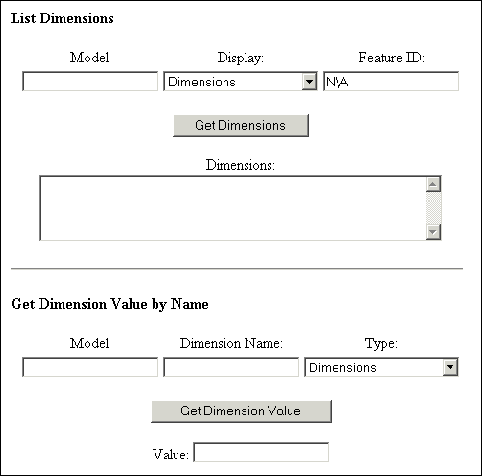
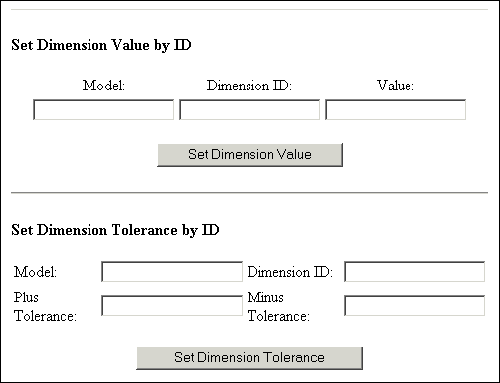
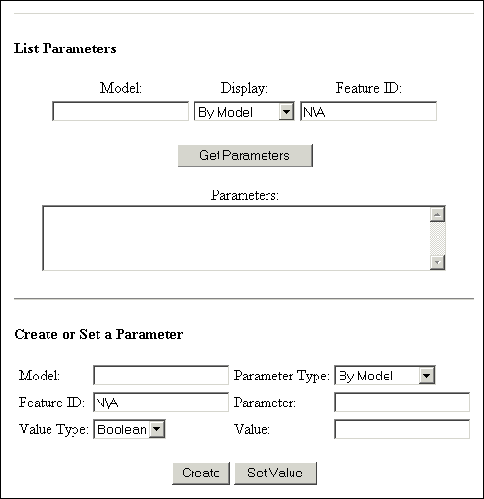
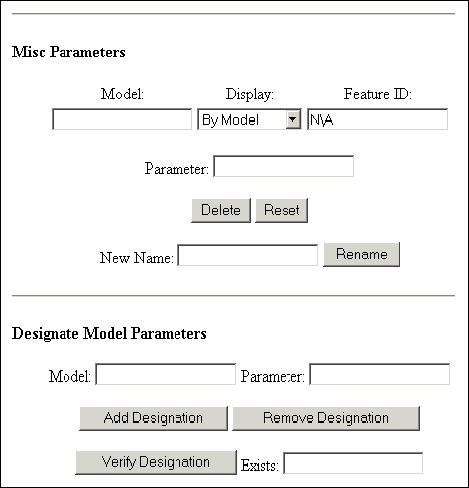
    The following figures show the results of this example, as seen in the browser. Note that the first figure does not include the standard header. See section JavaScript Header for more information on the wl_header.js header.
    Image
    Image
    Dimensions
    This section describes the Web.Link functions that enable you to access and manipulate dimensions in Creo Parametric.
    Note
    These functions are supported for parts, assemblies, and drawings, but are not supported for sections.
    Reading and Modifying Dimensions
    Functions Introduced:
  • pfcScript.pwlMdlDimensionsGet()
  • pfcScript.pwlFeatureDimensionsGet()
  • pfcScript.pwlDimensionInfoGetByID()
  • pfcScript.pwlDimensionInfoGetByName()
  • pfcScript.pwlDimensionValueSetByID()
  • To retrieve the dimensions or reference dimensions on a model, use the function pfcScript.pwlMdlDimensionsGet(). The syntax is as follows:
       pwlMdlDimensionsGet (
         string  MdlNameExt,  // The full name of the model
                              // to which the dimensions
                              // belong.
         integer DimType      // The dimension type. Use
                              // parseInt with this argument.
       );
       Additional return fields: 
         integer NumDims;     // The number of dimensions.
         integer DimIDs[];    // The dimension identifiers.
    
    The valid values for DimType are PWL_DIMENSION and PWL_REF_DIMENSION, which determine whether the function should retrieve standard (geometry) or reference dimensions, respectively.
    The function pfcScript.pwlFeatureDimensionsGet() gets the dimensions for the specified feature. Note that this function does not return any reference dimensions. (Features do not own reference dimensions—the model does.) The syntax is as follows:
       pwlFeatureDimensionsGet (
          string  MdlNameExt,  // The full name of the model
                               // to which the dimensions
                               // belong.
          integer FeatID       // The feature to which the
                               // dimensions belong. Use
                               // parseInt with this argument.
       );
       Additional return fields: 
          integer NumDims;     // The number of dimensions. 
          integer DimIDs[];    // The dimension identifiers.
    
    Web.Link provides two powerful functions to retrieve information about dimensions— pfcScript.pwlDimensionInfoGetByID() and pfcScript.pwlDimensionInfoGetByName(). The syntax for the functions is as follows:
       pwlDimensionInfoGetByID (
           string  MdlNameExt,    // The full name of the
                                  // model to which the
                                  // dimension belongs.
           integer DimensionID,   // The integer identifier
                                  // of the dimension. Use
                                  // parseInt with this
                                  // argument.
           integer DimensionType  // The dimension type
                                  // (PWL_DIMENSION or
                                  // PWL_REF_DIMENSION). Use
                                  // parseInt with this
                                  // argument.
       );
     
       pwlDimensionInfoGetByName (
          string   MdlNameExt,    // The full name of the 
                                  // model to which the
                                  // dimension belongs.
          string   DimensionName, // The name of the
                                  // dimension.
          integer  DimensionType  // The dimension type
                                  // (PWL_DIMENSION or
                                  // PWL_REF_DIMENSION). Use
                                  // parseInt with this
                                  // argument.
       );
    Both functions return the following additional fields:
          number  DimValue;   // The value of the dimension
          integer DimID;      // The dimension identifier
          string  DimName;    // The name of the dimension
          integer DimStyle;   // The dimension style
          integer TolType,    // The tolerance type
          number  TolPlus;    // The tolerance amount above
                              // the nominal value
          number  TolMinus    // The tolerance amount below
                              // the nominal value
    The possible values for the DimStyle field are as follows:
    •  PWL_LINEAR_DIM—Linear dimension
    •  PWL_RADIAL_DIM—Radial dimension
    •  PWL_DIAMETRICAL_DIM—Diametrical dimension
    •  PWL_ANGULAR_DIM—Angular dimension
    The possible values for TolType are as follows:
    •  PWL_TOL_DEFAULT—Displays the nominal tolerance.
    •  PWL_TOL_PLUS_MINUS—Displays the nominal tolerance with a plus/minus.
    •  PWL_TOL_LIMITS—Displays the upper and lower tolerance limits.
    •  PWL_TOL_PLUS_MINUS_SYM—Displays the tolerance as Image +/-x, +/-, where x is the plus tolerance. The value of the minus tolerance is irrelevant and unused.
    The function pfcScript.pwlDimensionValueSetByID() enables you to set the value of a dimension. The syntax is as follows:
       pwlDimensionValueSetByID (
          string  MdlNameExt,   // The full name of the model
                                // to which the dimension
                                // belongs.
          integer DimensionID,  // The integer identifier of
                                // the dimension. Use parseInt
                                // with this argument.
          number Value          // The new value of the
                                // dimension. Use parseFloat
                                // with this argument.
       );
    The function pfcScript.pwlDimensionValueSetByID() does not require a dimension type because you cannot set reference dimensions.
    Note
    This function works for solids only (parts, assemblies, and derivative types).
    Dimension Tolerance
    Function introduced:
  • pfcScript.pwlDimensionToleranceSetByID()
  • To set the dimension tolerance, call the function pfcScript.pwlDimensionToleranceSetByID(). The syntax is as follows:
       pwlDimensionToleranceSetByID (
          string  MdlNameExt,  // The full name of the model
                               // to which the dimension
                               // belongs.
          integer DimensionID, // The integer identifier
                               // of the dimension. Use
                               // parseInt with this argument.
          number  TolPlus,     // The positive element of
                               // the tolerance. Use
                               // parseFloat with this
                               // argument.
          number  TolMinus     // The negative element of
                               // the tolerance. Use
                               // parseFloat with this
                               // argument.
       );
    Note
    This function works for solids only (parts, assemblies, and derivative types).
    Dimension Example
    The following example shows how to use the Web.Link dimension functions.
    <html>
    <head>
    <title>Web.Link Dimensions Test</title>
    
    <script src="../jscript/pfcUtils.js">
    </script>
    <script src="../jscript/wl_header.js">
    document.writeln ("Error loading Web.Link header!");
    </script>
    
    <script language="JavaScript">
    function WlDimensionGet()
    //     Gets the dimensions, reference dimensions, or feature dimensions.
    {
        var ret;
        var FunctionName;
        var DimType;
    
        if (document.list_dim.ModelNameExt.value == "")
        {
            return ;
        }
    
        if (document.list_dim.DimType.options[
                document.list_dim.DimType.selectedIndex].value == "BY_FEATURE")
        {
            if (document.list_dim.FeatureID.value == "")
            {
                return ;
            }
               FeatureID = parseInt (document.list_dim.FeatureID.value);
               if (isNaN (FeatureID))
                   {
                        alert ("Feature ID invalid: "+document.list_dim.FeatureID.value);
                        return;
                   }
            ret = document.pwl.pwlFeatureDimensionsGet(
                      document.list_dim.ModelNameExt.value,
                      FeatureID);
            FunctionName = "pwlFeatureDimensionsGet";
            DimType = document.pwlc.PWL_DIMENSION_STANDARD;
        }
        else
        {
               DimType = document.pwl.eval(document.list_dim.DimType.options[
                                  document.list_dim.DimType.selectedIndex].value);
               if (isNaN (DimType) || DimType == -10001)
                   {
                        alert ("Could not recognize dim type");     
                   }
    /*
              if (DimType == document.pwlc.PWL_DIMENSION_STANDARD)
              {
                   pfcDimType = 10;  // pfcITEM_DIMENSION
              }
              else
              {     
                   pfcDimType = 11;  // pfcITEM_REF_DIMENSION
              }
    
            var s = glob.GetProSession ();
              
              var m = s.GetModelFromFileName (document.list_dim.ModelNameExt.value);
    
              if (m == void null)
              {
                   alert ("Couldn't find model: "+document.list_dim.ModelNameExt.value);
                   return;
              }
              var items = m.ListItems (pfcDimType);
              if (items == void null)
              {
                   alert ("Model items were null!");
                   return;
              }
              if (items.Count == 0)
              {
                   alert ("Empty items!");
              }
              else
                   alert ("Items :" + items.Count);
         }
    */
                ret = document.pwl.pwlMdlDimensionsGet(
                      document.list_dim.ModelNameExt.value,
                      DimType);
            FunctionName = "pwlMdlDimensionsGet";
        }
        if (!ret.Status)
        {
            alert(FunctionName + " failed (" + ret.ErrorCode + "): " + ret.ErrorString);
            return ;
        }
        document.list_dim.DimValues.value = "";
          for (var i = 0; i < ret.NumDims; i++)  
        {
            var info_ret = document.pwl.pwlDimensionInfoGetByID(
                               document.list_dim.ModelNameExt.value,
                               ret.DimIDs.Item(i), DimType);
            if (!info_ret.Status)
            {
                alert("pwlDimensionInfoGetByID failed (" + info_ret.ErrorCode +
                      ")");
                return ;
            }
            document.list_dim.DimValues.value += info_ret.DimName + " (#" +
                info_ret.DimID + "):  " + info_ret.DimValue +
                ((info_ret.DimStyle == parseInt(document.pwlc.PWL_ANGULAR_DIM)) ?
                 " degrees" : "") + " (-" + info_ret.TolMinus + "/+" +
                info_ret.TolPlus + ")\n";
        }
    }
    
    function WlDimensionGetByName()
    //     Gets a dimension by name.
    {
        if (document.get_value_name.ModelNameExt.value == "" ||
            document.get_value_name.DimName.value == "")
        {
            return ;
        }
        var DimType = document.pwl.eval(document.get_value_name.DimType.options[
                            document.get_value_name.DimType.selectedIndex].value);
         if (isNaN (DimType) || DimType == -10001)
                   {
                        alert ("Could not recognize dim type");     
                   }
        var ret = document.pwl.pwlDimensionInfoGetByName(
                      document.get_value_name.ModelNameExt.value,
                      document.get_value_name.DimName.value,
                      DimType);
        if (!ret.Status)
        {
            alert("pwlDimensionInfoGetByName failed (" + ret.ErrorCode + ")");
            return ;
        }
        document.get_value_name.DimValue.value = ret.DimName + " (#" +
            ret.DimID + "):  " + ret.DimValue +
            ((ret.DimStyle == parseInt(document.pwlc.PWL_ANGULAR_DIM)) ?
             " degrees" : "") + " (-" + ret.TolMinus + "/+" + ret.TolPlus + ")";
    }
    
    function WlDimensionSetByID()
    //     Sets the value of a dimension.
    {
        if (document.set_value_id.ModelNameExt.value == "" ||
            document.set_value_id.DimID.value == "" ||
            document.set_value_id.DimValue.value == "")
        {
            return ;
        }
         DimensionID = parseInt(document.set_value_id.DimID.value);
         if (isNaN (DimensionID))
         {
              alert ("Invalid dimension id: "+document.set_value_id.DimID.value);
              return;
         }
    
         DimensionValue = parseFloat(document.set_value_id.DimValue.value);
         if (isNaN (DimensionValue))
         {
              alert ("Invalid dimension value: "+document.set_value_id.DimValue.value);
              return;
         }
    
    
        var ret = document.pwl.pwlDimensionValueSetByID(
                      document.set_value_id.ModelNameExt.value,
                      DimensionID,
                      DimensionValue);
        if (!ret.Status)
        {
            alert("pwlDimensionValueSetByID failed (" + ret.ErrorCode + ")");
            return ;
        }
    }
    
    function WlDimensionSetToleranceByID()
    //     Sets the tolerance of a dimension.
    {
        var ret = document.pwl.pwlDimensionToleranceSetByID(
                      document.set_tol.ModelNameExt.value,
                      parseInt(document.set_tol.DimID.value),
                      parseFloat(document.set_tol.TolPlus.value),
                      parseFloat(document.set_tol.TolMinus.value));
        if (!ret.Status)
        {
            alert("pwlDimensionValueToleranceByID failed (" + ret.ErrorCode + ")");
            return ;
        }
    }
    
    function NotApplicable(form)
    //     Prints N\A in the feature ID field when a model is selected.
    {
        if (form.DimType.options[form.DimType.selectedIndex].value != "BY_FEATURE")
        {
            form.FeatureID.value = "N\\A";
        }
        else if (form.FeatureID.value == "N\\A")
        {
            form.FeatureID.value = "";
        }
    }
    
    </script>
    </head>
    <body>
    <form name="list_dim">
      <h4>List Dimensions</h4>
      <div align="center"><center><p><!-- Input arguments --> </p>
      </center></div><div align="center"><center><table>
        <tr>
          <td><div align="center"><center><p>Model:</td>
          <td align="center"><div align="center"><center><p>Display:</td>
          <td align="center"><div align="center"><center><p>Feature ID:</td>
        </tr>
        <tr align="center">
          <td><input type="text" name="ModelNameExt" size="20"></td>
          <td><select name="DimType" onchange="NotApplicable(document.list_dim)" size="1">
            <option value="PWL_DIMENSION_STANDARD" selected>Dimensions</option>
            <option value="PWL_DIMENSION_REFERENCE">Reference Dimensions</option>
            <option value="BY_FEATURE">By Feature ID</option>
          </select></td>
          <td><input type="text" name="FeatureID" value="N\A" size="20"></td>
        </tr>
      </table>
      </center></div><!-- Buttons -->
    <div align="center"><center><p><input type="button" value="Get Dimensions"
      onclick="WlDimensionGet()"></p>
      </center></div><div align="center"><center><p><!-- Output arguments --> Dimensions:<br>
      <textarea name="DimValues" rows="4" cols="50"></textarea> </p>
      </center></div><hr align="center">
    </form>
    <form name="get_value_name">
      <h4>Get Dimension Value by Name</h4>
      <div align="center"><center><p><!-- Input arguments --> </p>
      </center></div><div align="center"><center><table>
        <tr>
          <td><div align="center"><center><p>Model:</td>
          <td align="center"><div align="center"><center><p>Dimension Name:</td>
          <td align="center"><div align="center"><center><p>Type:</td>
        </tr>
        <tr align="center">
          <td><input type="text" name="ModelNameExt" size="20"></td>
          <td><input type="text" name="DimName" size="20"></td>
          <td><select name="DimType" size="1">
            <option value="PWL_DIMENSION_STANDARD" selected>Dimensions</option>
            <option value="PWL_DIMENSION_REFERENCE">Reference Dimensions</option>
          </select></td>
        </tr>
      </table>
      </center></div><!-- Buttons -->
    <div align="center"><center><p><input type="button"
      value="Get Dimension Value" onclick="WlDimensionGetByName()"></p>
      </center></div><div align="center"><center><p><!-- Output arguments --> 
    Value: <input type="text" name="DimValue"
      size="20"> </p>
      </center></div><hr align="center">
    </form>
    <form name="set_value_id">
      <h4>Set Dimension Value by ID</h4>
      <div align="center"><center><p><!-- Input arguments --> </p>
      </center></div><div align="center"><center><table>
        <tr>
          <td><div align="center"><center><p>Model:</td>
          <td align="center"><div align="center"><center><p>Dimension ID:</td>
          <td align="center"><div align="center"><center><p>Value:</td>
        </tr>
        <tr align="center">
          <td><input type="text" name="ModelNameExt" size="20"></td>
          <td><input type="text" name="DimID" size="20"></td>
          <td><input type="text" name="DimValue" size="20"></td>
        </tr>
      </table>
      </center></div><!-- Buttons -->
    <div align="center"><center><p><input type="button"
      value="Set Dimension Value" onclick="WlDimensionSetByID()"> </p>
      </center></div><hr align="center">
    </form>
    <form name="set_tol">
      <h4>Set Dimension Tolerance by ID</h4>
      <div align="center"><center><p><!-- Input arguments --> </p>
      </center></div><div align="center"><center><table>
        <tr>
          <td>Model:</td>
          <td><input type="text" name="ModelNameExt" size="20"></td>
          <td>Dimension ID:</td>
          <td><input type="text" name="DimID" size="20"></td>
        </tr>
        <tr>
          <td>Plus Tolerance:</td>
          <td><input type="text" name="TolPlus" size="20"></td>
          <td>Minus Tolerance:</td>
          <td><input type="text" name="TolMinus" size="20"></td>
        </tr>
      </table>
      </center></div><!-- Buttons -->
    <div align="center"><center><p><input type="button"
      value="Set Dimension Tolerance" onclick="WlDimensionSetToleranceByID()"> </p>
      </center></div><hr>
    </form>
    </body>
    </html>
    The following figures show the results of this example, as seen in the browser. Note that the first figure does not include the standard header. Refer to the section JavaScript Header for more information on the wl_header.js header.
    Image
    Image
    Simplified Representations
    This section describes the Web.Link functions that enable you to access and manipulate simplified representations.
    Retrieving Simplified Representations
    Functions Introduced:
  • pfcScript.pwlSimprepOpen()
  • pfcScript.pwlGraphicsSimprepOpen()
  • pfcScript.pwlGeomSimprepOpen()
  • pfcScript.pwlMdlSimprepsGet()
  • The function pfcScript.pwlSimprepOpen() opens the specified simplified representation. The syntax is as follows:
       pwlSimprepOpen (
          string  AsmNameExt,       // The full name of
                                    // the part or assembly.
          string  Path,             // The full path to the
                                    // model.
          string  RepName,          // The name of
                                    // the simplified
                                    // representation.
          boolean DisplayInWindow   // If this is true,
                                    // display the simplified
                                    // representation in a
                                    // window.
       );
       Additional return field: 
          integer WindowID;         // The identifier of
                                    // the window in which
                                    // the simplified
                                    // representation is
                                    // displayed.
    There is a difference between opening a simplified representation and activating it. Opening a simplified representation requires Creo Parametric to read from the disk and open the appropriate representation of the specified model. Activating a simplified representation does not require Creo Parametric to read from the disk because the model containing the simplified representation is already open. This operation is analogous to the Creo Parametric operation of setting a view to be current (the model is already in session; only the model display changes).
    The function pfcScript.pwlGraphicsSimprepOpen() retrieves the graphics of the specified assembly. The syntax is as follows:
       pwlGraphicsSimprepOpen (
          string  AsmNameExt,        // The full name of the
                                     // part or assembly
          string  Path,              // The full path to the
                                     // model
          boolean DisplayInWindow    // Specifies whether to
                                     // display the simplified
                                     // representation in a
                                     // window
       );
       Additional return field:
          integer WindowID;          // The identifier of the
                                     // window in which
                                     // the simplified
                                     // representation is
                                     // displayed
    The pfcScript.pwlGeomSimprepOpen() function provides the geometry of the specified part or assembly. The syntax is as follows:
       pwlGeomSimprepOpen (
          string  AsmNameExt,        // The full name of
                                     // the part or assembly
          string  Path,              // The full path to
                                     // the model
          boolean DisplayInWindow    // Specifies whether to
                                     // display the simplified
                                     // representation in a
                                     // window
       );
       Additional return field:
          integer WindowID;          // The identifier of the
                                     // window in which
                                     // the simplified
                                     // representation is
                                     // displayed
    
    If you try to open a model that already exists in memory, the open functions ignore the Path argument.
    Note
    The open functions will successfully open the simplified representation that is in memory—even if the specified Path is incorrect.
    Use the function pfcScript.pwlMdlSimprepsGet() to list all the simplified representations in the specified model. The syntax is as follows:
       pwlMdlSimprepsGet (
          string  MdlNameExt     // The full name of the model
       );
       Additional return fields: 
          integer NumSimpreps;   // The number of simplified
                                 // representations
          string  Simpreps[];    // The list of simplified
                                 // representations
    Activating Simplified Representations
    Functions Introduced:
  • pfcScript.pwlSimprepActivate()
  • pfcScript.pwlSimprepMasterActivate()
  • pfcScript.pwlGeomSimprepActivate()
  • pfcScript.pwlGraphicsSimprepActivate()
  • The function pfcScript.pwlSimprepActivate() activates the specified simplified representation. The syntax is as follows:
       pwlSimprepActivate (
          string  MdlNameExt,   // The full name of the model
          string  SimprepName   // The name of the simplified
                                // representation
       );
    To activate the master simplified representation, call the function pfcScript.pwlSimprepMasterActivate(). The syntax is as follows:
       pwlSimprepMasterActivate (
          string  MdlNameExt    // The full name of the model
       );
    The function pfcScript.pwlGeomSimprepActivate() activates the geometry simplified representation of the specified model. The syntax is as follows:
       pwlGeomSimprepActivate (
          string  MdlNameExt    // The full name of the model
       );
    The pfcScript.pwlGraphicsSimprepActivate() function activates the graphics simplified representation of the specified model. The syntax is as follows:
       pwlGraphicsSimprepActivate (
          string  MdlNameExt    // The full name of the model
       );
    Solids
    This section describes the Web.Link functions that enable you to access and manipulate solids and their contents.
    Mass Properties
    Function introduced:
  • pfcScript.pwlSolidMassPropertiesGet()
  • The function pfcScript.pwlSolidMassPropertiesGet() provides information about the distribution of mass in the specified part or assembly. It can provide the information relative to a coordinate system datum, which you name, or the default one if you provide an empty string or null as the name. The syntax is as follows:
       pwlSolidMassPropertiesGet (
          string  MdlNameExt,          // The full name of
                                       // the model.
          string  CoordinateSys        // The coordinate
                                       // system used to get
                                       // the mass properties.
       );
       Additional return fields:
          number  Volume;              // The volume.
          number  SurfaceArea;         // The surface area.
          number  Density;             // The density. The
                                       // density value is
                                       // 1.0, unless a
                                       // material has been
                                       // assigned.
          number  Mass;                // The mass.
          number  CenterOfGravity[3];  // The center of
                                       // gravity (COG).
          number  Inertia[9];          // The inertia matrix.
          number  InertiaTensor[9];    // The inertia tensor.
          number  CogInertiaTensor[9]; // The inertia about
                                       // the COG.
          number  PrincipalMoments[3]; // The principal
                                       // moments of inertia
                                       // (the eigenvalues
                                       // of the COG inertia).
          number  PrincipalAxes[9];    // The principal
                                       // axes (the
                                       // eigenvectors of
                                       // the COG inertia).
    Cross Sections
    Functions Introduced:
  • pfcScript.pwlSolidXSectionDisplay()
  • pfcScript.pwlSolidXSectionsGet()
  • To display a cross section, use the function pfcScript.pwlSolidXSectionDisplay(). The syntax is as follows:
       pwlSolidXSectionDisplay (
          string  MdlNameExt,        // The full name of
                                     // the model
          string  CrossSectionName   // The name of the
                                     // cross section to
                                     // display
       );
    The function pfcScript.pwlSolidXSectionsGet() returns all the cross sections on the specified part or assembly. The syntax is as follows:
       pwlSolidXSectionsGet (
          string  MdlNameExt           // The full name of the
                                       // model (part or
                                       // assembly)
       );
       Additional return fields:
          integer NumCrossSections;    // The number of cross
                                       // sections
          string  CrossSectionNames[]; // The names of the
                                       // cross sections
    Family Tables
    This section describes the Web.Link functions that enable you to access and manipulate family tables.
    Overview
    Family table functions are divided into three groups, distinguished by the prefix of the function name:
    •  pwlFamtabItem—Functions that modify table-driven items
    •  pwlFamtabInstance—Functions that modify an instance in the family table
    •  pwlInstance—Functions that perform file-management operations for family table instances
    The following sections describe these functional groups in detail.
    Family Table Items
    Functions Introduced:
  • pfcScript.pwlFamtabItemsGet()
  • pfcScript.pwlFamtabItemAdd()
  • pfcScript.pwlFamtabItemRemove()
  • Every item in a family table is uniquely identified by two values—its name and the family item type. The following table lists the possible values of the family item type.
    Constant
    Description
    PWL_FAM_USER_PARAM
    A user-defined parameter
    PWL_FAM_DIMENSION
    A dimension
    PWL_FAM_IPAR_NOTE
    A parameter in a pattern
    PWL_FAM_FEATURE
    A feature
    PWL_FAM_ASMCOMP
    A single instance of a component in an assembly
    PWL_FAM_UDF
    A user-defined feature
    PWL_FAM_ASMCOMP_MODEL
    All instances of a component in an assembly
    PWL_FAM_GTOL
    A geometric tolerance
    PWL_FAM_TOL_PLUS
    The plus value of a tolerance
    PWL_FAM_TOL_MINUS
    The minus value of a tolerance
    PWL_FAM_TOL_PLUSMINUS
    A tolerance
    PWL_FAM_SYSTEM_PARAM
    A system parameter
    PWL_FAM_EXTERNAL_REFERENCE
    An external reference
    The function pfcScript.pwlFamtabItemsGet() returns a list of all the table-driven elements currently in the family table. The syntax is as follows:
       pwlFamtabItemsGet (
          string MdlNameExt       // The full name of the
                                  // model
       );
       Additional return fields:
          integer    NumItems;        // The number of items
          integer    FamItemTypes[];  // The types of items
          string Items[];         // The list of table-driven 
                                  // elements
    The first item in the table would have the item type FamItemTypes[0] and name Items[0]. Similar correspondence between the two arrays exist for every item in the table.
    To add or remove items from a family table, use the functions pfcScript.pwlFamtabItemAdd() and pwlFamtabItemRemove(), respectively. The syntax of the functions is as follows:
       pwlFamtabItemAdd (
           string  MdlNameExt,  // The full name of the model.
           integer FamItemType, // The type of family item.
                                // Use parseInt with this
                                // argument.
           string  Name         // The name of the item to add.
       );
    
       pwlFamtabItemRemove (
           string  MdlNameExt,  // The full name of the
                                // model.
           integer FamItemType, // The type of family item.
                                // Use parseInt with this
                                // argument.
           string  Name         // The name of the item to
                                // remove.
       );
    Adding and Deleting Family Table Instances
    Functions Introduced:
  • pfcScript.pwlFamtabInstancesGet()
  • pfcScript.pwlFamtabInstanceAdd()
  • pfcScript.pwlFamtabInstanceRemove()
  • To get a list of all the instances of a generic, call the function pfcScript.pwlFamtabInstancesGet(). The syntax is as follows:
       pwlFamtabInstancesGet (
          string  MdlNameExt       // The full name of the
                                     model
       );
       Additional return fields:
          integer NumInstances;    // The number of instances
          string  InstanceNames[]; // The names of the
                                   // instances
    
    The function pfcScript.pwlFamtabInstanceAdd() creates a new instance. The syntax is as follows:
       pwlFamtabInstanceAdd (
          string MdlNameExt,   // The full name of the model
          string Name          // The name of the instance
                               // to add
       );
    Initially, a new instance will have all asterisks in the family table, making it equal to the generic.
    To remove an existing instance from a family table, call the function pfcScript.pwlFamtabInstanceRemove(). The syntax is as follows:
       pwlFamtabInstanceRemove (
          string MdlNameExt,   // The full name of the model
          string Name          // The name of the instance to
                               // remove
       );
    If the instance has been opened, the object continues to exist but will no longer be associated with the family table.
    Family Table Instance Values
    Functions Introduced:
  • pfcScript.pwlFamtabInstanceValueGet()
  • pfcScript.pwlFamtabInstanceValueSet()
  • The function pfcScript.pwlFamtabInstanceValueGet() provides the value for the specified instance and item. The syntax is as follows:
       pwlFamtabInstanceValueGet (
          string  MdlNameExt,   // The full name of the
                                // model.
          string  Name,         // The name of the instance.
          integer FamItemType,  // The type of family item.
                                // Use parseInt with this
                                // argument.
          string  ItemName      // The name of the item.
       );
       Additional return fields: 
          integer ValueType;    // Specifies which value
                                // argument to use.
          integer IntVal;       // The integer value.
          number  DoubleVal;    // The number value.
          string  StringVal;    // The string value.
          boolean BooleanVal;   // The Boolean value.
    
    The function returns five additional fields, but only two will be set to anything. The field ValueType is always set and its value determines what other field should be used, according to the following table.
    Value of the ValueType
    Additional Field Used
    PWL_VALUE_INTEGER
    IntVal
    PWL_VALUE_DOUBLE
    DoubleVal
    PWL_VALUE_STRING
    StringVal
    PWL_VALUE_BOOLEAN
    BooleanVal
    Setting the value of an instance item using the function pfcScript.pwlFamtabInstanceValueSet() requires several arguments to allow for all the possibilities. The syntax is as follows:
       pwlFamtabInstanceValueSet (
          string  MdlNameExt,   // The full name of the
                                // model.
          string  Name,         // The name of the instance.
          integer FamItemType,  // The type of the family
                                // table item. Use parseInt
                                // with this argument.
          string  ItemName,     // The name of the item.
          integer ValueType,    // Specifies which value
                                // argument to use. Use
                                // parseInt with this
                                // argument.
          integer IntVal,       // The integer value. Use
                                // parseInt with this
                                // argument.
          number  DoubleVal,    // The number value. Use
                                // parseFloat with this
                                // argument.
          string  StringVal,    // The string value.
          boolean BooleanVal    // The Boolean value.
       );
    The value of ValueType determines which of the other four values will be used. Although only one of IntVal, DoubleVal, StringVal, and BooleanVal will be used, all must be the proper data types or the Java function will not be found, and an error will occur.
    Locking Family Table Instances
    Functions Introduced:
  • pfcScript.pwlFamtabInstanceLockGet()
  • pfcScript.pwlFamtabInstanceLockAdd()
  • pfcScript.pwlFamtabInstanceLockRemove()
  • The function pfcScript.pwlFamtabInstanceLockGet() determines whether the specified model is locked for modification. The function returns this information in the Boolean field Locked. A locked instance cannot be modified. The syntax is as follows:
       pwlFamtabInstanceLockGet (
          string  MdlNameExt,   // The full name of the model.
          string  Name          // The name of the instance.
       );
       Additional return fields: 
          boolean Locked;       // If this is true, the model
                                // is locked for modification.
    To add a lock, call the function pfcScript.pwlFamtabInstanceLockAdd(). The syntax is as follows:
       pwlFamtabInstanceLockAdd (
          string MdlNameExt,   // The full name of the model
          string Name          // The name of the instance
                               // to which to add the lock
       );
    Call the function pfcScript.pwlFamtabInstanceLockRemove() to remove the specified lock. The syntax is as follows:
       pwlFamtabInstanceLockRemove (
          string MdlNameExt,   // The full name of the model
          string Name          // The name of the instance
                               // from which to remove the
                               // lock
       );
    File Management Functions for Instances
    Functions Introduced:
  • pfcScript.pwlInstanceOpen()
  • pfcScript.pwlInstanceErase()
  • The function pfcScript.pwlInstanceOpen() enables you to open an instance in a manner similar to pfcScript.pwlMdlOpen(). The syntax is as follows:
       pwlInstanceOpen (
          string  MdlNameExt,     // The full name of the 
                                  // model.
          string  InstanceName,   // The name of the instance
                                  // to open.
          boolean DisplayInWindow // If this is true, display
                                  // the instance in a window.
       );
       Additional return fields: 
          integer WindowID;       // The identifier of the
                                  // window in which the
                                  // instance is displayed.
    The generic must already reside in memory. The Boolean argument determines whether the instance should be displayed. If the instance is to be displayed in a window, the function returns the additional field, WindowID.
    To erase an instance from memory, use the function pfcScript.pwlInstanceErase(). The syntax is as follows:
       pwlInstanceErase (
          string MdlNameExt,  // The full name of the model
          string Name         // The name of the instance to
                              // erase from memory
    );
    Layers
    This section describes the Web.Link functions that enable you to access and manipulate layers.
    Layer Functions
    Functions Introduced:
  • pfcScript.pwlMdlLayersGet()
  • pfcScript.pwlLayerCreate()
  • pfcScript.pwlLayerDelete()
  • pfcScript.pwlLayerDisplayGet()
  • pfcScript.pwlLayerDisplaySet()
  • pfcScript.pwlLayerItemsGet()
  • pfcScript.pwlLayerItemAdd()
  • pfcScript.pwlLayerItemRemove()
  • The function pfcScript.pwlMdlLayersGet() provides the number and a list of all the layers in the specified model. The syntax is as follows:
       pwlMdlLayersGet (
          string  MdlNameExt     // The full name of the model
       );
       Additional return fields: 
          integer NumLayers;     // The number of layers in
                                 // the returned array
          string  LayerNames[];  // The array of layer names
    
    The function pfcScript.pwlLayerCreate() enables you to create a new layer. The syntax is as follows:
       pwlLayerCreate (
          string MdlNameExt,  // The full name of the model
          string LayerName    // The name of the layer to
                              // create
       );
    To delete a layer, call the function pfcScript.pwlLayerDelete().
    The syntax is as follows:
       pwlLayerDelete (
          string MdlNameExt,  // The full name of the model
          string LayerName    // The name of the layer to
                              // delete
       );
    The function pfcScript.pwlLayerDisplayGet() provides the display type of the specified layer. The syntax is as follows:
       pwlLayerDisplayGet (
          string  MdlNameExt,   // The full name of the model
          string  LayerName     // The name of the layer
       );
       Additional return field:
          integer DisplayType;  // The display type
    
    The valid values for DisplayType are as follows:
    •  PWL_DISPLAY_TYPE_NORMAL—A normal layer.
    •  PWL_DISPLAY_TYPE_DISPLAY—A layer selected for display.
    •  PWL_DISPLAY_TYPE_BLANK—A blanked layer.
    •  PWL_DISPLAY_TYPE_HIDDEN—A hidden layer. This applies to Assembly mode only.
    To set the display type of a layer, use the function pfcScript.pwlLayerDisplaySet(). The syntax is as follows:
       pwlLayerDisplaySet (
          string  MdlNameExt,  // The full name of the model.
          string  LayerName,   // The name of the layer.
          integer DisplayType  // The new display type. Use
                               // parseInt with this argument.
       );
    The function pfcScript.pwlLayerItemsGet() lists the items assigned to the specified layer. The syntax is as follows:
       pwlLayerItemsGet (
          string   MdlNameExt,   // The full name of the model
          string   LayerName     // The name of the layer
       );
       Additional return fields:
          integer  NumItems;     // The number of items in
                                 // ItemIDs
          ItemType ItemTypes[];  // The array of item types
          integer  ItemIDs[];    // The array of item
                                 // identifiers
          string   ItemOwners[]; // The array of item owners
    The possible values for ItemType are as follows:
    •  PWL_PART
    •  PWL_FEATURE
    •  PWL_DIMENSION
    •  PWL_REF_DIMENSION
    •  PWL_GTOL
    •  PWL_ASSEMBLY
    •  PWL_QUILT
    •  PWL_CURVE
    •  PWL_POINT
    •  PWL_NOTE
    •  PWL_IPAR_NOTE
    •  PWL_SYMBOL_INSTANCE
    •  PWL_DRAFT_ENTITY
    •  PWL_DIAGRAM_OBJECT
    To add an item to a layer, call the function pfcScript.pwlLayerItemAdd(). The syntax is as follows:
       pwlLayerItemAdd (
          string  MdlNameExt, // The full name of the model.
          string  LayerName,  // The name of the layer.
          integer ItemType,   // The type of layer item. Use
                              // parseInt with this
                              // argument.
          integer ItemID,     // The identifier of the item
                              // to add. Use parseInt with
                              // this argument.
          string  ItemOwner   // The owner of the item.
       );
    If ItemOwner is null or an empty string, the item owner is the same as the layer. Otherwise, it is a selection string to the component that owns the item.
    To delete an item from a layer, call the function pfcScript.pwlLayerItemRemove(). The syntax is as follows:
       pwlLayerItemRemove (
          string  MdlNameExt, // The full name of the model.
          string  LayerName,  // The name of the layer.
          integer ItemType,   // The type of layer item. Use
                              // parseInt with this
                              // argument.
          integer ItemID,     // The identifier of the item
                              // to remove. Use parseInt
                              // with this argument.
          string  ItemOwner   // The item owner. If this is
                              // null or an empty string,
                              // the item owner is the same
                              // as the layer. Otherwise,
                              // it is a selection string
                              // to the component that
                              // owns the item.
       );
    Notes
    This section describes the Web.Link functions that enable you to access the notes created in Creo Parametric.
    Notes Inquiry
    Functions Introduced:
  • pfcScript.pwlMdlNotesGet()
  • pfcScript.pwlFeatureNotesGet()
  • pfcScript.pwlNoteOwnerGet()
  • The function pfcScript.pwlMdlNotesGet() returns the number and a list of all the note identifiers in the specified model. The syntax is as follows:
       pwlMdlNotesGet (
          string  MdlNameExt    // The full name of the model
       );
       Additional return fields: 
          integer NumNotes;     // The number of notes in
                                // the array NoteIDs
          integer NoteIDs[];    // The array of note
                                // identifiers
    The function pfcScript.pwlFeatureNotesGet() provides the number and a list of all the note identifiers for the specified feature in the model. Note that this function does not apply to drawings. The syntax is as follows:
       pwlFeatureNotesGet (
          string  MdlNameExt,   // The full name of the model.
          integer FeatureID     // The feature whose notes
                                // should be found. Use
                                // parseInt with this
                                // argument.
       );
       Additional return fields:
          integer NumNotes;     // The number of notes in
                                // the array NoteIDs.
          integer NoteIDs[];    // The array of note
                                // identifiers.
    
    The pfcScript.pwlNoteOwnerGet() function gets the owner of the specified note. The syntax is as follows:
       pwlNoteOwnerGet (
          string  MdlNameExt,   // The full name of the
                                // model.
          integer NoteID        // The identifier of the
                                // note whose owner you want.
                                // Use parseInt with this
                                // argument.
       );
       Additional return fields:
          integer ItemType;      // The item type.
          integer NoteOwnerID;   // The identifier of the
                                 // notes owner. This
                                 // field is not applicable
                                 // if ItemType is PWL_MODEL.
    Note
    •  You cannot modify the owner of the note.
    •  The function pfcScript.pwlNoteOwnerGet() does not apply to drawings.
    Note Names
    Functions Introduced:
  • pfcScript.pwlNoteNameGet()
  • pfcScript.pwlNoteNameSet()
  • The pfcScript.pwlNoteNameGet() function returns the name of the specified note, given its identifier. The syntax is as follows:
       pwlNoteNameGet (
          string  MdlNameExt,  // The full name of the model.
          integer NoteID       // The note identifier. Use
                               // parseInt with this
                               // argument.
       );
       Additional return field: 
         string   NoteName;    // The name of the note.
    To set the name of a note, call the function pfcScript.pwlNoteNameSet(). The syntax is as follows:
       pwlNoteNameSet (
          string  MdlNameExt,   // The full name of the model.
          integer NoteID,       // The note identifier. Use
                                // parseInt with this
                                // argument.
          string  NewName       // The new name of the note.
       );
    
    Note
    These functions do not apply to drawings.
    Note Text
    Functions Introduced:
  • pfcScript.pwlNoteTextGet()
  • pfcScript.pwlNoteTextSet()
  • The function pfcScript.pwlNoteTextGet() returns the number of lines and the text strings for the specified note in the model. Symbols are replaced by an asterisk (*). The syntax is as follows:
       pwlNoteTextGet (
          string  MdlNameExt,   // The full name of the model.
          integer NoteID        // The note identifier. Use 
                                // parseInt with this
                                // argument.
       );
       Additional return fields:
          integer NumTextLines; // The number of lines of 
                                // text in the note.
          string  NoteText[];   // The text of the note.
    
    To set the text of a note, call the function pfcScript.pwlNoteTextSet(). This function supports standard ASCII characters only. The syntax is as follows:
       pwlNoteTextSet (
          string  MdlNameExt,    // The full name of the
                                 // model.
          integer NoteID,        // The note identifier. Use
                                 // parseInt with this
                                 // argument.
          integer NumTextLines,  // The number of lines of
                                 // text in the note. Use
                                 // parseInt with this
                                 // argument.
          string  NewNoteText[]  // The text of the new note.
       );
    
    Note
    You cannot set symbols.
    Note URLs
    Functions Introduced:
  • pfcScript.pwlNoteURLGet()
  • pfcScript.pwlNoteURLSet()
  • The pfcScript.pwlNoteURLSet() provides the Uniform Resource Locator (URL) of the specified note, given its identifier. The syntax is as follows:
       pwlNoteURLGet (
          string  MdlNameExt,  // The full name of the model.
          integer NoteID       // The note identifier. Use
                               // parseInt with this argument.
       );
       Additional return field:
          string  NoteURL;     // The URL of the note.
    
    To set the URL, call the function pfcScript.pwlNoteURLSet(). The syntax is as follows:
       pwlNoteURLSet (
          string  MdlNameExt,  // The full name of the model.
          integer NoteID,      // The note identifier. Use
                               // parseInt with this argument.
          string  NoteURL      // The URL of the note.
       );
    Note
    These functions do not apply to drawings.
    Utilities
    This section describes the utility functions provided by the old Web.Link module. The utility functions enable you to manipulate directories and arrays, and to get the value of a given environment variable.
    Environment Variables
    Function introduced:
    The function pfcScript.pwlEnvVariableGet() returns the value of the specified environment variable. The syntax is as follows:
       pwlEnvVariableGet (
          string  VarName   // The name of the environment
                            // variable whose value you want
       );
          Additional return field:
          string  Value;    // The value
    
    The following code fragment shows how to get the value of the environment variable NPX_PLUGIN_PATH.
    <SCRIPT language = "JavaScript">
    .
    
    function EnvVar()
    {
      ret = document.pwl.pwlEnvVariableGet ("NPX_PLUGIN_PATH");
    
      if (ret.Status)
      {
         document.ui.RETVAL.value = "Success: Value is " + ret.Value;
      }
      else
      {
         document.ui.RETVAL.value = stat.ErrorCode+": " + ret.ErrorString;
      }
    }
    </script>
    Manipulating Directories
    Functions Introduced:
  • pfcScript.pwlDirectoryCurrentGet()
  • pfcScript.pwlDirectoryCurrentSet()
  • pfcScript.pwlDirectoryFilesGet()
  • The function pfcScript.pwlDirectoryCurrentGet() provides the path to the current directory. The syntax is as follows:
       pwlDirectoryCurrentGet();
       Additional return field:
          string  DirectoryPath;    // The path to the
                                    // current directory
    The pfcScript.pwlDirectoryCurrentSet() function sets the current directory to the one specified by the argument DirectoryPath. The syntax is as follows:
       pwlDirectoryCurrentSet (
          string  DirectoryPath     // The directory to make
                                    // current
       );
    The function pfcScript.pwlDirectoryFilesGet() lists the files and subdirectories for the specified directory. Note that you can pass a filter to get only those files that have the specified extensions. The function returns the number of files found and a list of file names. The syntax is as follows:
       pwlDirectoryFilesGet (
          string  DirectoryPath, // The directory whose
                                 // files and subdirectories
                                 // you want to find. If this
                                 // is null, the function
                                 // lists the files in the
                                 // current Creo Parametric
                                 // directory.
          string  Filter         // The filter string for the
                                 // file extensions,
                                 // separated by commas. For
                                 // example. "*.prt," "*.txt".
                                 // If this is null, the
                                 // function lists all the
                                 // files and directories.
       );
       Additional return fields:
          integer NumFiles;      // The number of files in
                                 // FileNames.
          string  FileNames[];   // The list of file names.
          integer NumSubdirs;    // The number of
                                 // subdirectories.
          string  SubdirNames;   // The list of subdirectory
                                 // names.
    Allocating Arrays
    Functions Introduced:
  • pfcScript.pwluBooleanArrayAlloc()
  • pfcScript.pwluDoubleArrayAlloc()
  • pfcScript.pwluIntArrayAlloc()
  • pfcScript.pwluStringArrayAlloc()
  • These functions allocate arrays of Boolean values, doubles, integers, and strings, respectively. Each function takes a single argument.
    Note
    These functions return the allocated array.
    The syntax of the functions is as follows:
       boolean pwluBooleanArrayAlloc (
          integer ArraySize // The size of the Boolean
                            // array to allocate. Use
                            // parseInt with this argument.
       );
       
       number[] pwluDoubleArrayAlloc (
          integer ArraySize // The size of the number array
                            // to allocate. Use parseInt
                            // with this argument.
       );
       
       integer[] pwluIntArrayAlloc (
          integer ArraySize // The size of the integer array
                            // to allocate. Use parseInt
                            // with this argument.
       );
       
       string[] pwluStringArrayAlloc (
          integer ArraySize // The size of the string array
                            // to allocate. Use parseInt with
                            // this argument.
       );
    Refer to section Features for a code example that uses the pfcScript.pwluIntArrayAlloc() function. See the section Selection for a code example that uses the pfcScript.pwluStringArrayAlloc() function.
    Superseded Methods
    Due to the changes in the connection and security model in the embedded browser version of Web.Link, the following methods belonging to the older version of Pro/Web.Link are obsolete:
    •  pwlProEngineerStartAndConnect
    •  pwlProEngineerConnect
    •  pwlProEngineerDisconnectAndStop
    •  pwlAccessRequest
    Note
    These functions are provided in the embedded browser Web.Link in order to avoid scripting errors. They are not useful in developing any applications and can be removed.
    Web.Link Constants
    This section lists the constants defined for Web.Link. The constants are arranged alphabetically in each category (Dimension Styles, Dimension Types, Family Table Types, and so on).
    Dimension Styles
    The class pfcPWLConstants contains the following constants:
    Constant
    Description
    PWL_LINEAR_DIM
    Linear dimension
    PWL_RADIAL_DIM
    Radial dimension
    PWL_DIAMETRICAL_DIM
    Diametrical dimension
    PWL_ANGULAR_DIM
    Angular dimension
    PWL_UNKNOWN_STYLE_DIM
    Unknown dimension
    Dimension Types
    The class pfcPWLConstants contains the following constants:
    Constant
    Description
    PWL_DIMENSION_STANDARD
    Standard dimension
    PWL_DIMENSION_REFERENCE
    Reference dimension
    Family Table Types
    The class pfcPWLConstants contains the following constants:
    Constant
    Description
    PWL_FAM_TYPE_UNUSED
    Unused
    PWL_FAM_USER_PARAM
    User parameter
    PWL_FAM_DIMENSION
    Dimension
    PWL_FAM_IPAR_NOTE
    IPAR note
    PWL_FAM_FEATURE
    Feature
    PWL_FAM_ASMCOMP
    Assembly component
    PWL_FAM_UDF
    User-defined feature
    PWL_FAM_ASMCOMP_MODEL
    Assembly component model
    PWL_FAM_GTOL
    Geometric tolerance
    PWL_FAM_TOL_PLUS
    Displays the nominal tolerance with a plus
    PWL_FAM_TOL_MINUS
    Displays the nominal tolerance with a minus
    PWL_FAM_TOL_PLUSMINUS
    Displays the nominal tolerance with a plus/minus
    PWL_FAM_SYSTEM_PARAM
    System parameter
    PWL_FAM_EXTERNAL_REFERENCE
    External reference
    Feature Group Pattern Statuses
    The class pfcPWLConstants contains the following constants:
    Constant
    Description
    PWL_GRP_PATTERN_INVALID
    Invalid group pattern.
    PWL_GRP_PATTERN_NONE
    The feature is not in a group pattern.
    PWL_GRP_PATTERN_LEADER
    The feature is the leader of the group pattern.
    PWL_GRP_PATTERN_MEMBER
    The feature is a member of the group pattern.
    Feature Group Statuses
    The class pfcPWLConstants contains the following constants:
    Constant
    Description
    PWL_GROUP_INVALID
    Invalid group.
    PWL_GROUP_NONE
    The feature is not in a group pattern.
    PWL_GROUP_MEMBER
    The feature is in a group that is a group pattern member.
    Feature Pattern Statuses
    The class pfcPWLConstants contains the following constants:
    Constant
    Description
    PWL_PATTERN_INVALID
    Invalid pattern.
    PWL_PATTERN_NONE
    The feature is not in a pattern.
    PWL_PATTERN_LEADER
    The feature is the leader of a pattern.
    PWL_PATTERN_MEMBER
    The feature is a member of the pattern.
    Feature Types
    The class pfcPWLFeatureConstants contains the following constants:
    Constant
    Feature Type
    PWL_FEAT_FIRST_FEAT
    First feature
    PWL_FEAT_HOLE
    Hole
    PWL_FEAT_SHAFT
    Shaft
    PWL_FEAT_ROUND
    Round
    PWL_FEAT_CHAMFER
    Chamfer
    PWL_FEAT_SLOT
    Slot
    PWL_FEAT_CUT
    Cut
    PWL_FEAT_PROTRUSION
    Protrusion
    PWL_FEAT_NECK
    Neck
    PWL_FEAT_FLANGE
    Flange
    PWL_FEAT_RIB
    Rib
    PWL_FEAT_EAR
    Ear
    PWL_FEAT_DOME
    Dome
    PWL_FEAT_DATUM
    Datum
    PWL_FEAT_LOC_PUSH
    Local push
    PWL_FEAT_FEAT_UDF
    User-defined feature (UDF)
    PWL_FEAT_DATUM_AXIS
    Datum axis
    PWL_FEAT_DRAFT
    Draft
    PWL_FEAT_SHELL
    Shell
    PWL_FEAT_DOME2
    Second dome
    PWL_FEAT_CORN_CHAMF
    Corner chamfer
    PWL_FEAT_DATUM_POINT
    Datum point
    PWL_FEAT_IMPORT
    Import
    PWL_FEAT_COSMETIC
    Cosmetic
    PWL_FEAT_ETCH
    Etch
    PWL_FEAT_MERGE
    Merge
    PWL_FEAT_MOLD
    Mold
    PWL_FEAT_SAW
    Saw
    PWL_FEAT_TURN
    Turn
    PWL_FEAT_MILL
    Mill
    PWL_FEAT_DRILL
    Drill
    PWL_FEAT_OFFSET
    Offset
    PWL_FEAT_DATUM_SURF
    Datum surface
    PWL_FEAT_REPLACE_SURF
    Replacement surface
    PWL_FEAT_GROOVE
    Groove
    PWL_FEAT_PIPE
    Pipe
    PWL_FEAT_DATUM_QUILT
    Datum quilt
    PWL_FEAT_ASSEM_CUT
    Assembly cut
    PWL_FEAT_UDF_THREAD
    Thread
    PWL_FEAT_CURVE
    Curve
    PWL_FEAT_SRF_MDL
    Surface model
    PWL_FEAT_WALL
    Wall
    PWL_FEAT_BEND
    Bend
    PWL_FEAT_UNBEND
    Unbend
    PWL_FEAT_CUT_SMT
    Sheetmetal cut
    PWL_FEAT_FORM
    Form
    PWL_FEAT_THICKEN
    Thicken
    PWL_FEAT_BEND_BACK
    Bend back
    PWL_FEAT_UDF_NOTCH
    UDF notch
    PWL_FEAT_UDF_PUNCH
    UDF punch
    PWL_FEAT_INT_UDF
    For internal use
    PWL_FEAT_SPLIT_SURF
    Split surface
    PWL_FEAT_GRAPH
    Graph
    PWL_FEAT_SMT_MFG_PUNCH
    Sheetmetal manufacturing punch
    PWL_FEAT_SMT_MFG_CUT
    Sheetmetal manufacturing cut
    PWL_FEAT_FLATTEN
    Flatten
    PWL_FEAT_SET
    Set
    PWL_FEAT_VDA
    VDA
    PWL_FEAT_SMT_MFG_FORM
    Sheetmetal manufacturing for milling
    PWL_FEAT_SMT_PUNCH_PNT
    Sheetmetal punch point
    PWL_FEAT_LIP
    Lip
    PWL_FEAT_MANUAL
    Manual
    PWL_FEAT_MFG_GATHER
    Manufacturing gather
    PWL_FEAT_MFG_TRIM
    Manufacturing trim
    PWL_FEAT_MFG_USEVOL
    Manufacturing use volume
    PWL_FEAT_LOCATION
    Location
    PWL_FEAT_CABLE_SEGM
    Cable segment
    PWL_FEAT_CABLE
    Cable
    PWL_FEAT_CSYS
    Coordinate system
    PWL_FEAT_CHANNEL
    Channel
    PWL_FEAT_WIRE_EDM
    Wire EDM
    PWL_FEAT_AREA_NIBBLE
    Area nibble
    PWL_FEAT_PATCH
    Patch
    PWL_FEAT_PLY
    Ply
    PWL_FEAT_CORE
    Core
    PWL_FEAT_EXTRACT
    Extract
    PWL_FEAT_MFG_REFINE
    Manufacturing refine
    PWL_FEAT_SILH_TRIM
    Silhouette trim
    PWL_FEAT_SPLIT
    Split
    PWL_FEAT_EXTEND
    Extend
    PWL_FEAT_SOLIDIFY
    Solidify
    PWL_FEAT_INTERSECT
    Intersect
    PWL_FEAT_ATTACH
    Attach
    PWL_FEAT_XSEC
    Cross section
    PWL_FEAT_UDF_ZONE
    UDF zone
    PWL_FEAT_UDF_CLAMP
    UDF clamp
    PWL_FEAT_DRL_GRP
    Drill group
    PWL_FEAT_ISEGM
    Ideal segment
    PWL_FEAT_CABLE_COSM
    Cable cosmetic
    PWL_FEAT_SPOOL
    Spool
    PWL_FEAT_COMPONENT
    Component
    PWL_FEAT_MFG_MERGE
    Manufacturing merge
    PWL_FEAT_FIXSETUP
    Fixture setup
    PWL_FEAT_SETUP
    Setup
    PWL_FEAT_FLAT_PAT
    Flat pattern
    PWL_FEAT_CONT_MAP
    Contour map
    PWL_FEAT_EXP_RATIO
    Exponential ratio
    PWL_FEAT_RIP
    Rip
    PWL_FEAT_OPERATION
    Operation
    PWL_FEAT_WORKCELL
    Workcell
    PWL_FEAT_CUT_MOTION
    Cut motion
    PWL_FEAT_BLD_PATH
    Build path
    PWL_FEAT_DRV_TOOL_SKETCH
    Driven tool sketch
    PWL_FEAT_DRV_TOOL_EDGE
    Driven tool edge
    PWL_FEAT_DRV_TOOL_CURVE
    Driven tool curve
    PWL_FEAT_DRV_TOOL_SURF
    Driven tool surface
    PWL_FEAT_MAT_REMOVAL
    Material removal
    PWL_FEAT_TORUS
    Torus
    PWL_FEAT_PIPE_SET_START
    Piping set start point
    PWL_FEAT_PIPE_PNT_PNT
    Piping point
    PWL_FEAT_PIPE_EXT
    Pipe extension
    PWL_FEAT_PIPE_TRIM
    Pipe trim
    PWL_FEAT_PIPE_FOLL
    Follow (pipe routing)
    PWL_FEAT_PIPE_JOIN
    Pipe join
    PWL_FEAT_AUXILIARY
    Auxiliary
    PWL_FEAT_PIPE_LINE
    Pipe line
    PWL_FEAT_LINE_STOCK
    Line stock
    PWL_FEAT_SLD_PIPE
    Solid pipe
    PWL_FEAT_BULK_OBJECT
    Bulk object
    PWL_FEAT_SHRINKAGE
    Shrinkage
    PWL_FEAT_PIPE_JOINT
    Pipe joint
    PWL_FEAT_PIPE_BRANCH
    Pipe branch
    PWL_FEAT_DRV_TOOL_TWO_CNTR
    Driven tool (two centers)
    PWL_FEAT_SUBHARNESS
    Subharness
    PWL_FEAT_SMT_OPTIMIZE
    Sheetmetal optimize
    PWL_FEAT_DECLARE
    Declare
    PWL_FEAT_SMT_POPULATE
    Sheetmetal populate
    PWL_FEAT_OPER_COMP
    Operation component
    PWL_FEAT_MEASURE
    Measure
    PWL_FEAT_DRAFT_LINE
    Draft line
    PWL_FEAT_REMOVE_SURFS
    Remove surfaces
    PWL_FEAT_RIBBON_CABLE
    Ribbon cable
    PWL_FEAT_ATTACH_VOLUME
    Attach volume
    PWL_FEAT_BLD_OPERATION
    Build operation
    PWL_FEAT_UDF_WRK_REG
    UDF working region
    PWL_FEAT_SPINAL_BEND
    Spinal bend
    PWL_FEAT_TWIST
    Twist
    PWL_FEAT_FREE_FORM
    Free-form
    PWL_FEAT_ZONE
    Zone
    PWL_FEAT_WELDING_ROD
    Welding rod
    PWL_FEAT_WELD_FILLET
    Welding fillet
    PWL_FEAT_WELD_GROOVE
    Welding groove
    PWL_FEAT_WELD_PLUG_SLOT
    Welding plug slot
    PWL_FEAT_WELD_SPOT
    Welding spot
    PWL_FEAT_SMT_SHEAR
    Sheetmetal shear
    PWL_FEAT_PATH_SEGM
    Path segment
    PWL_FEAT_RIBBON_SEGM
    Ribbon segment
    PWL_FEAT_RIBBON_PATH
    Ribbon path
    PWL_FEAT_RIBBON_EXTEND
    Ribbon extend
    PWL_FEAT_ASMCUT_COPY
    Assembly cut copy
    PWL_FEAT_DEFORM_AREA
    Deform area
    PWL_FEAT_RIBBON_SOLID
    Ribbon solid
    PWL_FEAT_FLAT_RIBBON_SEGM
    Flat ribbon segment
    PWL_FEAT_POSITION_FOLD
    Position fold
    PWL_FEAT_SPRING_BACK
    Spring back
    PWL_FEAT_BEAM_SECTION
    Beam section
    PWL_FEAT_SHRINK_DIM
    Shrink dimension
    PWL_FEAT_THREAD
    Thread
    PWL_FEAT_SMT_CONVERSION
    Sheetmetal conversion
    PWL_FEAT_CMM_MEASSTEP
    CMM measured step
    PWL_FEAT_CMM_CONSTR
    CMM construct
    PWL_FEAT_CMM_VERIFY
    CMM verify
    PWL_FEAT_CAV_SCAN_SET
    CAV scan set
    PWL_FEAT_CAV_FIT
    CAV fit
    PWL_FEAT_CAV_DEVIATION
    CAV deviation
    PWL_FEAT_SMT_ZONE
    Sheetmetal zone
    PWL_FEAT_SMT_CLAMP
    Sheetmetal clamp
    PWL_FEAT_PROCESS_STEP
    Process step
    PWL_FEAT_EDGE_BEND
    Edge bend
    PWL_FEAT_DRV_TOOL_PROF
    Drive tool profile
    PWL_FEAT_EXPLODE_LINE
    Explode line
    PWL_FEAT_GEOM_COPY
    Geometric copy
    PWL_FEAT_ANALYSIS
    Analysis
    PWL_FEAT_WATER_LINE
    Water line
    PWL_FEAT_UDF_RMDT
    Rapid mold design tool
    PWL_FEAT_USER_FEAT
    User feature
    Layer Display Types
    The class pfcPWLConstants contains the following constants:
    Constant
    Description
    PWL_DISPLAY_TYPE_NONE
    No layer
    PWL_DISPLAY_TYPE_NORMAL
    A normal layer
    PWL_DISPLAY_TYPE_DISPLAY
    A layer selected for display
    PWL_DISPLAY_TYPE_BLANK
    A blanked layer
    PWL_DISPLAY_TYPE_HIDDEN
    A hidden layer
    Object Types
    The class pfcPWLConstants contains the following constants:
    Constant
    Description
    PWL_MODEL
    Model (for parameter functions)
    PWL_TYPE_UNUSED
    Unused
    PWL_ASSEMBLY
    Assembly
    PWL_PART
    Part
    PWL_FEATURE
    Feature
    PWL_DRAWING
    Drawing
    PWL_SURFACE
    Surface
    PWL_EDGE
    Edge
    PWL_3DSECTION
    Three-dimensional section
    PWL_DIMENSION
    Dimension
    PWL_2DSECTION
    Two-dimensional section
    PWL_LAYOUT
    Notebook
    PWL_AXIS
    Axis
    PWL_CSYS
    Coordinate system
    PWL_REF_DIMENSION
    Reference dimension
    PWL_GTOL
    Geometric tolerance
    PWL_DWGFORM
    Drawing form
    PWL_SUB_ASSEMBLY
    Subassembly
    PWL_MFG
    Manufacturing object
    PWL_QUILT
    Quilt
    PWL_CURVE
    Curve
    PWL_POINT
    Point
    PWL_NOTE
    Note
    PWL_IPAR_NOTE
    IPAR note
    PWL_EDGE_START
    Start of the edge
    PWL_EDGE_END
    End of the edge
    PWL_CRV_START
    Start of the curve
    PWL_CRV_END
    End of the curve
    PWL_SYMBOL_INSTANCE
    Symbol instance
    PWL_DRAFT_ENTITY
    Draft entity
    PWL_DRAFT_GROUP
    Draft group
    PWL_DRAW_TABLE
    Drawing table
    PWL_VIEW
    View
    PWL_REPORT
    Report
    PWL_MARKUP
    Markup
    PWL_LAYER
    Layer
    PWL_DIAGRAM
    Diagram
    PWL_SKETCH_ENTITY
    Sketched entity
    PWL_DATUM_PLANE
    Datum plane
    PWL_COMP_CRV
    Composite curve
    PWL_BND_TABLE
    Bend table
    PWL_PARAMETER
    Parameter
    PWL_DIAGRAM_OBJECT
    Diagram object
    PWL_DIAGRAM_WIRE
    Diagram wire
    PWL_SIMP_REP
    Simplified representation
    PWL_WELD_PARAMS
    Weld parameters
    PWL_EXTOBJ
    External object
    PWL_EXPLD_STATE
    Explode state
    PWL_RELSET
    Set of relations
    PWL_CONTOUR
    Contour
    PWL_GROUP
    Group
    PWL_UDF
    User-defined feature
    PWL_FAMILY_TABLE
    Family table
    PWL_PATREL_FIRST_DIR
    Pattern direction 1
    PWL_PATREL_SECOND_DIR
    Pattern direction 2
    Parameter Types
    The class pfcPWLConstants contains the following constants:
    Constant
    Description
    PWL_USER_PARAM
    User parameter
    PWL_DIM_PARAM
    Dimension parameter
    PWL_PATTERN_PARAM
    Pattern parameter
    PWL_DIMTOL_PARAM
    Dimension tolerance parameter
    PWL_REFDIM_PARAM
    Reference dimension parameter
    PWL_ALL_PARAMS
    All parameters
    PWL_GTOL_PARAM
    Geometric tolerance parameter
    PWL_SURFFIN_PARAM
    Surface finish parameter
    ParamType Field Values
    The class pfcPWLConstants contains the following constants:
    Constant
    Description
    PWL_VALUE_DOUBLE
    Double value
    PWL_VALUE_STRING
    String value
    PWL_VALUE_INTEGER
    Integer value
    PWL_VALUE_BOOLEAN
    Boolean value
    PWL_VALUE_NOTEID
    Note identifier
    ParamValue Values
    The class pfcPWLConstants contains the following constants:
    Constant
    Description
    PWL_PARAMVALUE_DOUBLE
    Double value
    PWL_PARAMVALUE_STRING
    String value
    PWL_PARAMVALUE_INTEGER
    Integer value
    PWL_PARAMVALUE_BOOLEAN
    Boolean value
    PWL_PARAMVALUE_NOTEID
    Note identifier
    Tolerance Types
    The class pfcPWLConstants contains the following constants:
    Constant
    Description
    PWL_TOL_DEFAULT
    Displays the nominal tolerance.
    PWL_TOL_PLUS_MINUS
    Displays the nominal tolerance with a plus/minus.
    PWL_TOL_LIMITS
    Displays the upper and lower tolerance limits.
    PWL_TOL_PLUS_MINUS_SYM
    Displays the tolerance as +/-x, where x is the plus tolerance. The value of the minus tolerance is irrelevant and unused.