| |
| |
| |
| |
| |
| |
| |
| |
| |
| |
| |
| |
| |
| |
| |
| |
| |
| |
| |
| • | pfcFeature.FeatType—Returns the type of a feature. |
| • | pfcFeature.Status—Returns whether the feature is suppressed, active, or failed regeneration. |
| • | pfcFeature.IsVisible—Identifies whether the specified feature will be visible on the screen. The method distinguishes visible features from internal features. Internal features are invisible features used for construction purposes. |
| • | pfcFeature.IsReadonly—Identifies whether the specified feature can be modified. |
| • | pfcFeature.IsEmbedded—Specifies whether the specified feature is an embedded datum. |
| • | pfcFeature.Number—Returns the feature regeneration number. This method returns void null if the feature is suppressed. |
| |
| |
| |
| |
| |
| |
| |
| |
| |
| |
| |
| |
| |
| |
| |
| |
| • | Clip—Specifies whether to delete or suppress all features after the selected feature. By default, this option is false. Use the properties pfcDeleteOperation.Clip and pfcSuppressOperation.Clip to modify this option.
|
| • | AllowGroupMembers—If this option is set to true and if the feature to be deleted or suppressed is a member of a group, then the feature will
be deleted or suppressed out of the group. If this option is set to false, then the entire group containing the feature is
deleted or suppressed. By default, this option is false. It can be set to true only if the option Clip is set to true. Use the properties pfcSuppressOperation.AllowGroupMembers and pfcDeleteOperation.AllowGroupMembers to modify this option.
|
| • | AllowChildGroupMembers—If this option is set to true and if the children of the feature to be deleted or suppressed are members of a group, then
the children of the feature will be individually deleted or suppressed out of the group. If this option is set to false, then
the entire group containing the feature and its children is deleted or suppressed. By default, this option is false. It can
be set to true only if the options Clip and AllowGroupMembers are set to true. Use the properties pfcSuppressOperation.AllowChildGroupMembers and pfcDeleteOperation.AllowChildGroupMembers to modify this option.
|
| • | KeepEmbeddedDatums—Specifies whether to retain the embedded datums stored in a feature while deleting the feature. By default, this option is
false. Use the property pfcDeleteOperation.KeepEmbeddedDatums to modify this option.
|
| • | WithParents—Specifies whether to resume the parents of the selected feature. Use the property pfcResumeOperation.WithParents to modify this option.
|
| • | BeforeFeat—Specifies the feature before which you want to reorder the features. Use the property pfcReorderBeforeOperation.BeforeFeat to modify this option.
|
| • | AfterFeat—Specifies the feature after which you want to reorder the features. Use the property pfcReorderAfterOperation.AfterFeat to modify this option.
|
| |
| |
| |
| |
| |
| |
| |
| |
| |
| |
| |
| |

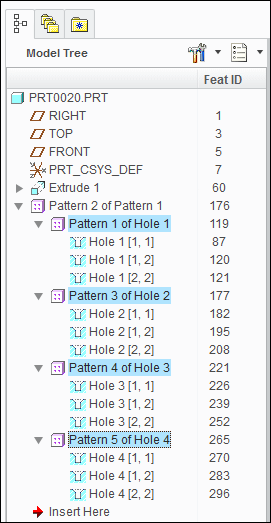
| • | 119 |
| • | 177 |
| • | 221 |
| • | 265 |
| • | PATTERN_FEAT—Feature pattern. |
| • | PATTERN_GROUP—Group pattern. |
| • | GRP_PATTERN_NONE—Feature does not belong to any pattern. |
| • | GRP_PATTERN_LEADER—Feature is leader of the pattern. |
| • | GRP_PATTERN_MEMBER—Feature is member of the pattern. |
| • | GRP_PATTERN_HEADER—Feature is header of the pattern. |
| • | GROUP_NONE—Feature does not belong to any group. |
| • | GROUP_MEMBER—Feature is member of the group. |
| • | GRP_PATTERN_NONE—Feature does not belong to any group pattern. |
| • | GRP_PATTERN_LEADER—Feature is leader of the group pattern. |
| • | GRP_PATTERN_MEMBER—Feature is member of the group pattern. |
| • | GRP_PATTERN_HEADER—Feature is header of the group pattern. |
| • | Models that contain groups will get one extra feature in the regeneration list, of type FEATTYPE_GROUP_HEAD of the enumerated data typepfcFeatureType. This affects the feature numbers of all subsequent features, including those in the group. |
| • | Each group automatically contains the header feature in the list of features returned from pfcFeaturePattern.ListMembers(). |
| • | Each group automatically gets the group head feature a s the leader. This is returned from pfcFeatureGroup.GroupLeader. |
| • | Each group pattern contains a series of groups, and each group in the pattern will be similarly constructed. |
| • | Suppress |
| • | Delete |
| • | Layers |
| • | Patterning |
| |
| |
| |
| |
| • | Information required by the UDF that was not provided in the input data structures. |
| • | Correct information to replace erroneous information |
| • | Name—The name of the UDF you are creating and the instance name if applicable. |
| • | Dependency—Specify if the UDF is independent of the UDF definition or is modified by the changers made to it. |
| • | Scale—How to scale the UDF relative to the placement model. |
| • | Variable Dimension—The new values of the variables dimensions and pattern parameters, those whose values can be modified each time the UDF is created. |
| • | Dimension Display—Whether to show or blank non-variable dimensions created within the UDF group. |
| • | References—The geometrical elements that the UDF needs in order to relate the features it contains to the existing models features. The elements correspond to the picks that Creo Parametric prompts you for when you create a UDF interactively using the prompts defined when the UDF was created. You cannot select an embedded datum as the UDF reference. |
| • | Parts Intersection—When a UDF that is being created in an assembly contains features that modify the existing geometry you must define which parts are affected or intersected. You also need to know at what level in an assembly each intersection is going to be visible. |
| • | Orientations—When a UDF contains a feature with a direction that is defined in respect to a datum plane Creo Parametric must know what direction the new feature will point to. When you create such a UDF interactively Creo Parametric prompt you for this information with a flip arrow. |
| • | Quadrants—When a UDF contains a linearly placed feature that references two datum planes to define it’s location in the new model Creo Parametric prompts you to pick the location of the new feature. This is determined by which side of each datum plane the feature must lie. This selection is referred to as the quadrant because the are four possible combinations for each linearly place feature. |
| • | UDFDEP_INDEPENDENT |
| • | UDFDEP_DRIVEN |
| • | UDFSCALE_SAME_SIZE |
| • | UDFSCALE_SAME_DIMS |
| • | UDFSCALE_CUSTOM |
| • | UDFSCALE_nil |
| • | UDFDISPLAY_NORMAL |
| • | UDFDISPLAY_READ_ONLY |
| • | UDFDISPLAY_BLANK |
| |
| |
| |
| • | Name—The symbol that the dimension had when the UDF was originally defined not the prompt that the UDF uses when it is created interactively. To make this name easy to remember, before you define the UDF that you plan to create with the Web.Link, you should modify the symbols of all the dimensions that you want to select to be variable. If you get the name wrong, pfcSolid.CreateUDFGroup() will not recognize the dimension and prompts the user for the value in the usual way does not modify the value. |
| • | DimensionValue—The new value. |
| • | name—The string name that the pattern parameter had when the UDF was originally defined |
| • | number—The new value. |
| |
| |
| |
| |
| • | PromptForReference—The prompt defined for this reference when the UDF was originally set up. It indicates which reference this structure is providing. If you get the prompt wrong, pfcSolid.CreateUDFGroup() will not recognize it and prompts the user for the reference in the usual way. |
| • | ReferenceItem—Specifies the pfcSelection object representing the referenced element. You can set pfcSelection programmatically or prompt the user for a selection separately. You cannot set an embedded datum as the UDF refereence. There are two types of reference:
|
| |
| |
| |
| • | ComponentPath—Is an intseq type object representing the component path of the part to be intersected. |
| • | Visibility level—The number that corresponds to the visibility level of the intersected part in the assembly. If the number is equal to the length of the component path the feature is visible in the part that it intersects. If Visibility level is 0, the feature is visible at the level of the assembly containing the UDF. |
| • | instance names—is a com.ptc.cipjava.stringseq type object representing the array of new instance names. |
| • | UDFORIENT_INTERACTIVE—Prompt for the orientation using a flip arrow. |
| • | UDFORIENT_NO_FLIP—Accept the default flip orientation. |
| • | UDFORIENT_FLIP—Invert the orientation from the default orientation. |